Shipyards send and receive large numbers of drawing comments during newbuilds, conversions and modification work. Xenmark gives the project team a structured review layer for issued PDFs: comments sit on the relevant drawing location, replies stay with the point, and revised PDFs can be reviewed without overwriting the earlier round.
It is not a yard document-management system or a design platform. It is the review workspace between the people issuing drawings and the people checking them.
How can a shipyard collect owner comments on one drawing?
Use one issued PDF as the shared review reference and let reviewers place numbered comments directly on the locations they want the yard or designer to address. Each numbered point has its own thread and status, so the yard can respond to the exact issue instead of reconciling several separately marked-up files.
That is useful when the owner’s technical team, consultants or other stakeholders all need to review the same drawing. Rather than returning one PDF from each reviewer, the project can keep the review conversation in one place.
The drawing remains an issued PDF. Xenmark does not modify the underlying engineering drawing, and it does not replace the yard’s CAD, ship-design or document-control systems.
For the broad workflow, see Ship Drawing Review and Newbuild Drawing Review.
How does the yard answer comments without losing the location?
Each Xenmark comment is anchored to a numbered pin on the drawing. The yard can answer in that comment’s reply thread, so clarification remains connected to the valve, door, equipment item, compartment or other location the owner originally marked.
That prevents a common handoff problem: the written response says “accepted” or “will revise,” but the recipient later has to reconstruct which mark or spreadsheet row the response belonged to.
Statuses provide a simple way to distinguish active and completed review points, while the activity log helps show what happened in the project. If the yard should only answer existing questions, the Project Manager can use the Participant role; if yard staff also need to add new review comments, an Editor role is more appropriate.
What happens when the yard issues the next drawing revision?
Upload the returned or reissued PDF into the same drawing slot as the next revision. The previous revision and its comments remain available, allowing the team to check the new drawing against what was discussed in the earlier review round.
Xenmark does not automatically decide that a point is resolved and does not move the old comment pin onto the new PDF. The reviewer still checks the revised drawing and decides whether the previous request was addressed.
New findings on the new revision should be raised as new comments on that revision. This keeps the record honest: the history shows what was raised on Rev A and what was found later on Rev B, rather than blending the rounds together.
How can a shipyard return a comment register to the owner?
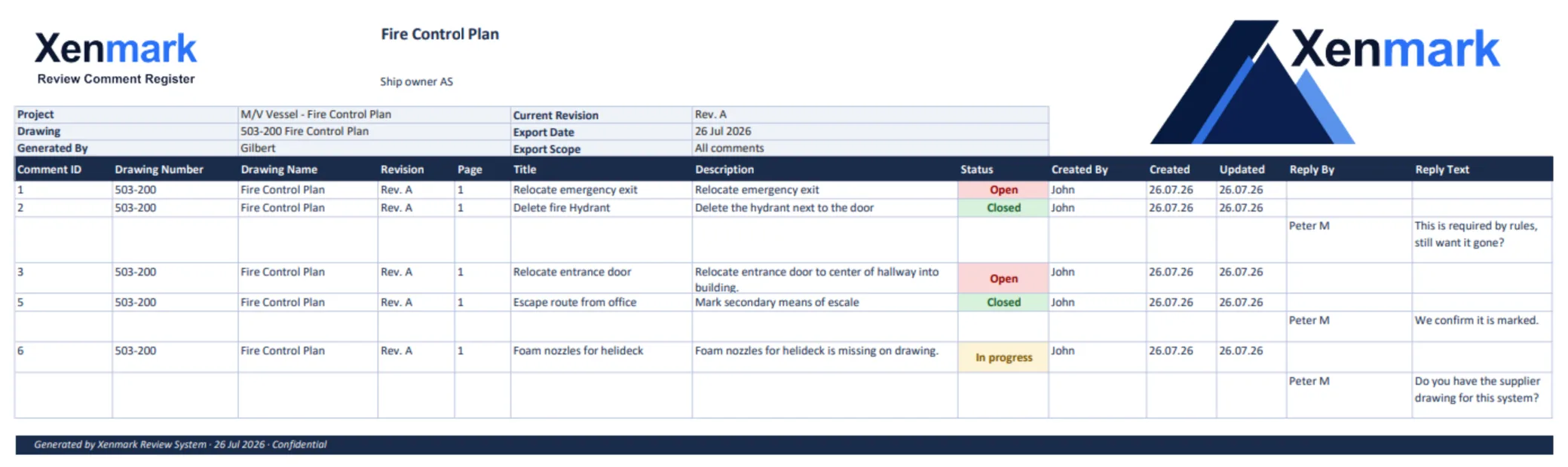
Xenmark can export a marked-up comment-plan PDF and a matching Excel comment register. The comment numbers correspond between the two outputs, so the owner can read the written list and find the same point on the drawing.
That can reduce manual reconciliation between a marked-up PDF and a separately maintained comment sheet. It also gives the yard and owner a common numbering system for meetings, email references and later review rounds.
The export should be described as a review record. It is not an approved drawing, a class submission record or a substitute for the yard’s document-management process.
See Maritime Drawing Comment Register.
How does Xenmark help with supplier interfaces?
Shipyard reviews often depend on information from equipment suppliers as well as the owner and designer. Xenmark can include invited supplier reviewers on the relevant PDF so interface questions are attached to the part of the drawing they concern.
Examples can include equipment position, access space, foundation arrangement, piping connection, cable routing or other drawing interfaces. The supplier can explain its requirement in the reply thread while the yard and designer keep the discussion tied to the drawing.
Supplier input remains review input. The responsible engineering and yard design teams decide how the interface is incorporated into the technical drawing.
See the Equipment Suppliers / Marine Vendors Team page.
Can shipyards use Xenmark before a drawing goes to class?
Yes, Xenmark can support an internal or owner review before formal class submission, but the formal submission and approval process remains outside Xenmark. The team can use the review to collect owner, yard, design-office and supplier comments before deciding that the drawing is ready for the next formal step.
If class comments later come back, the project team may use Xenmark as an internal coordination layer while the official class comments and responses remain in the classification society’s required system.
Xenmark does not determine compliance and does not issue approval. See Pre-Class Internal Drawing Review.
Is Xenmark a replacement for the yard’s DMS or CAD environment?
No. Xenmark is intentionally narrower. The yard’s document-management system continues to control the formal drawing issue, document status and project records required by the yard. CAD and ship-design software continues to create and revise the technical drawings.
Xenmark sits in the review layer: issued PDF in, structured comments and replies, revised PDF back, then a new review round. That narrow boundary makes it possible for owners, consultants, suppliers and yard personnel to participate without giving every reviewer access to the design environment.
Xenmark is for reviewing and coordinating issued PDF drawings. It does not replace the CAD or naval-architecture software used to create the design, and it does not perform class, flag, statutory or formal regulatory approval.