Ship drawings need to reflect what the project team knows—and, over time, what is actually onboard. During a newbuild, refit, equipment replacement or routine vessel operation, owners, shipyards, engineers and suppliers may each notice something the others need to understand. The difficult part is often getting a precise observation to the person who can assess it, then checking the revised drawing that comes back.
Xenmark gives the team a shared review layer around issued PDF drawings. Reviewers can place numbered comments at drawing locations, discuss each point, track review status and examine later PDF revisions. The responsible design or engineering party still prepares the technical drawing revision in its own authoring process. Any class, flag or statutory review happens through the applicable formal channel.
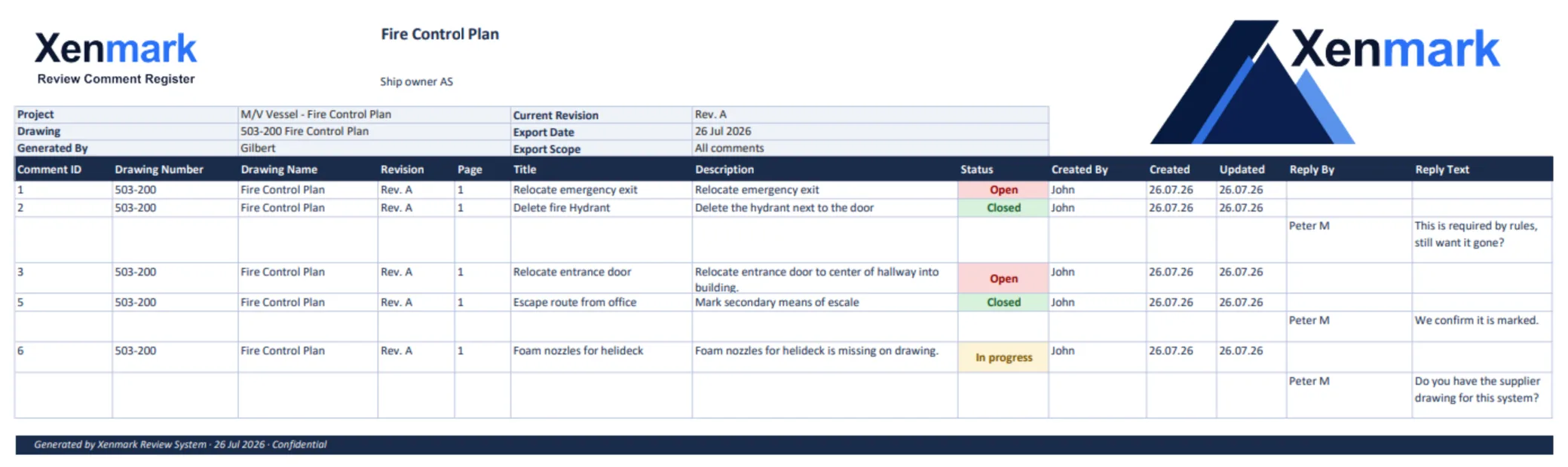
Choose the maritime drawing task in front of you
- A drawing no longer matches the vessel. Start with Vessel Drawing Updates to turn an onboard observation into a clear engineering handoff and a review of the returned PDF.
- Several parties need to review an issued ship drawing. See Ship Drawing Review & Markup for location-specific comments, discussion and a usable review record.
- A fire control plan needs to be checked against an observed change. See Fire Control Plan Review for a carefully scoped review process around the issued plan.
- The project is a newbuild. See Newbuild Drawing Review for owner–yard–designer comment rounds across drawing packages.
- The project modifies an existing ship. See Conversion, Refit & Retrofit Drawing Review for existing-condition questions and equipment interfaces.
More specialized resources cover the maritime comment register and internal review before a separate class submission. Guides provide worked procedures for revised drawings, fire-control-plan updates, owner–engineer handoffs and drawing-specific reviews.
What happens when a vessel no longer matches its drawing?
Start with the latest known issued drawing, even when it may already be outdated in places. Record the difference at a specific location: what the drawing shows, what is observed onboard, and what evidence supports the observation. A photo, equipment tag, compartment reference or known dimension can make the question easier to assess. Label uncertain information as uncertain.
The vessel-side observation is input for technical evaluation, not a verified instruction to change the design. The responsible engineer or designer asks for clarification where needed, decides what technical revision is appropriate and issues a revised drawing PDF through the project’s normal process. Reviewers then check whether their earlier concerns were addressed and whether the new issue introduces other questions.
Earlier Xenmark review comments remain with the revision on which they were made. The team reviews the returned revision and makes its own judgement about each point; the software does not automatically move comments onto new geometry or decide that a design change resolved an issue.
Who contributes to a ship drawing review?
The roles vary by project, but the handoff usually crosses organizational boundaries. A crew member or superintendent may know the present onboard condition. An owner representative may know the intended operational outcome. A shipyard may know installation constraints. A supplier may know an equipment interface. A marine engineering company or designer is responsible for the technical interpretation and drawing revision within its agreed scope.
Keeping those contributions attached to the drawing location reduces the chance that “the pump” or “the port-side access” means different things to different people. It also makes a question easier to answer: the next reviewer can see the location, the original comment, the replies and the current review status together.
Xenmark supports that conversation. It does not replace the vessel owner’s document-control process, the responsible designer, or a classification society or authority portal.
How do drawing revisions and review records fit together?
A ship drawing review is rarely a single marked-up file. The first issue may reveal questions; the next issue must be checked against those questions and reviewed for new ones. Use the drawing number and revision in the discussion, not a filename alone. Keep the earlier review history with the earlier PDF, then document the team’s assessment of the newer issue.
At the end of a review round, a matching annotated PDF and Excel comment record can provide a portable account of what was raised and discussed. That record can support the project’s handoff and archive. It is not the same as an approved technical drawing or a formal regulatory determination.
Which drawings can this approach support?
The common thread is an issued PDF that people need to review together. A general arrangement may raise access and equipment-location questions. A machinery or piping drawing may require exact tags and references to avoid ambiguity. A fire control plan may need a carefully documented observation and a separately controlled revision. The right level of review, required technical checks and any formal approval depend on the drawing, vessel and project.
Choose the guide that matches the immediate task. For example, How to Review Revised Ship Drawing PDFs explains a second-round check, while the Owner–Engineer Drawing Review guide shows what information can make a vessel-side request answerable.
More maritime workflows
Maritime Drawing Comment Register shows how numbered drawing locations and replies become a portable review record across organizations and revisions. Review Ship Drawings Before Class Submission covers the internal project review that can happen before a separate formal class channel. Ship Classification Societies and Drawing Approval explains the class boundary and the documented systems for DNV, LR, BV and ABS. These specialist pages sit alongside the three core tasks and the newbuild/refit project pages under this Maritime & Shipbuilding hub.
Practical maritime guides
- How to Review Revised Ship Drawing PDFs — a manual second-round check of old and new points.
- Updating a Ship Fire Control Plan After Onboard Changes — a careful discrepancy-to-revision procedure.
- How to Maintain a Ship Drawing Comment Register — stable identifiers and revision context.
- Owner–Engineer Drawing Review During Vessel Modifications — the evidence handoff between vessel and designer.
- PDF Markup vs CAD Editing for Ship Drawing Changes — where review ends and technical authoring begins.
- Reviewing General Arrangement Drawings With External Stakeholders — owner, yard, designer and supplier comments on a GA.
- Reviewing Piping and Machinery Drawing PDFs Across Revisions — tags, sheets and dense technical context.
- How to Prepare a Drawing Review Before Class Submission — an internal worksheet with a clear formal handoff.
- How Ship Owners Can Scope Several Small Drawing Updates at Once — grouping observations for engineering assessment.
- Redlines vs a Structured Comment Register for Vessel Drawing Updates — when a visual note needs a traceable response.
Related Teams: who reviews maritime drawings?
Ship Owners coordinate owner-side reviews and drawing-update requests. Shipyards exchange comments and revised drawings with owners, designers and suppliers. Superintendents and Technical Managers turn onboard discrepancies into clear questions. Marine Engineering Companies clarify and author technical changes within their scope. Equipment Suppliers and Marine Vendors contribute information where a design interfaces with supplied equipment.
These are Teams, linked from this Industry hub so each reader can continue to a page written for their role. They are not separate maritime industries.
What does a useful request look like?
Compare two requests for the same vessel drawing. “Drawing outdated; please fix” leaves the engineering company to discover which drawing, where the difference is and whether the observation is reliable. A usable request identifies the issued drawing and revision, marks the precise location, describes what was found onboard, attaches a photograph or other evidence, and asks the responsible party to advise what needs technical assessment. The stronger request does not pretend the owner has already decided the design solution.
The returned drawing then needs a separate review. A reply saying “updated” is not the same as the owner seeing the new issue, checking the original concern and recording its conclusion. That is why this page points to both Vessel Drawing Updates and How to Review Revised Ship Drawing PDFs: they cover different parts of one connected job.
How should a project choose between maritime pages and global Use Cases?
The maritime pages answer questions that depend on vessels, onboard observations, owner–yard–engineer handoffs, newbuild packages, refit uncertainty or fire-control-plan context. The global Use Cases explain a workflow that applies across industries: drawing review, PDF markup, external review, revision review, comment tracking and review handover. A reader who needs to know how a comment register works in general can go to the global page; a reader who needs to reconcile a ship’s drawing number, revision and owner/yard responses can use the maritime page.
What should the team decide before opening a review?
Agree which issued PDF is the reference, who is invited to review it, who can answer design questions, and where the official drawing will be stored. If a vessel-side observation is uncertain, label it before discussion starts. If a formal approval or survey may be involved, ask the responsible party which channel applies. Those decisions make a shared review useful without pretending the review tool owns the entire document or approval lifecycle.
The review record is only as good as the drawing identity and the evidence behind its points. A clear comment on the wrong revision can mislead a project as easily as a vague comment on the right one. Each page in this cluster therefore repeats the essential habit: identify the issued file, pin the issue precisely, explain the source of the observation, and check the returned revision deliberately.
This page is a place to choose the right path, not a substitute for every specialist page. A reader dealing with one onboard discrepancy can go directly to Vessel Drawing Updates; a yard managing a newbuild package can go to Newbuild Drawing Review; a reviewer checking Rev B can use How to Review Revised Ship Drawing PDFs.
The five audience pages are linked here, but they are not Industries. The same vessel drawing can matter to an owner, yard and engineer for different reasons. The Team links explain each party’s work; the maritime pages explain the shared drawing-review problem.
Maritime workflows
Vessel Drawing Updates
Capture onboard drawing discrepancies, clarify them with engineers and review the revised ship drawing PDF that comes back.
Ship Drawing Review & Markup
Review issued ship drawing PDFs with owners, yards, engineers and suppliers using location-specific comments, replies and revision records.
Fire Control Plan Review
Record observed fire-control-plan differences, coordinate the responsible revision and review the returned PDF while keeping formal approval separate.
Newbuild Drawing Review
Coordinate owner, yard, designer and supplier comments on issued newbuild drawings, then check the next revision against them.
Conversion, Refit & Retrofit Drawing Review
Review issued PDFs during ship modifications when existing conditions, new equipment and multiple project parties must be reconciled.
Maritime Drawing Comment Register
Keep owner, yard and engineer comments tied to ship drawing numbers, locations and revisions in one usable review record for the project.
Review Before Class Submission
Coordinate internal owner, yard and design comments before formal class submission, then review returned drawing revisions.
Classification Societies & Drawing Approval
Where DNV, Lloyd's Register, Bureau Veritas and ABS review ship drawings, and where internal Xenmark review fits before and after class submission.
Practical maritime guides
Reviewing Revised Ship Drawing PDFs
A practical method for checking a new ship drawing revision against earlier comments and recording what changed on each point.
Updating a Fire Control Plan
A cautious workflow for recording onboard plan differences, arranging a technical revision and reviewing the returned fire-control-plan PDF.
Maintaining a Ship Drawing Comment Register
Keep ship drawing comments understandable across organizations and revisions with stable IDs, drawing references, replies and review outcomes.
Owner–Engineer Drawing Review
Turn owner-side observations into clear engineering questions, then review the revised vessel drawing that comes back from the engineer.
PDF Markup vs CAD Editing
Understand how PDF review comments support ship drawing changes while the responsible designer creates the controlled technical revision.
Reviewing General Arrangement Drawings
Coordinate owner, yard, designer and supplier comments on an issued general arrangement drawing and resolve conflicting points.
Reviewing Piping and Machinery Drawings
Make precise comments on dense piping and machinery PDFs using tags, line references and manual checks of later drawing revisions.
Preparing a Review Before Class Submission
Prepare an internal owner, yard and design review of ship drawings before the separate, formal classification-society submission process.
Scoping Several Vessel Drawing Updates
Collect multiple small onboard drawing discrepancies into a clear, evidence-backed scope that a marine engineering company can assess.
Redlines vs a Comment Register
Compare visual redlines with numbered review comments and a structured register, using the same issue across ship drawing revisions.