Ship owners receive drawings from yards, engineering companies and suppliers throughout a vessel's life. Xenmark gives the owner's technical team a browser-based place to review those issued PDFs, mark specific points, answer questions and check later revisions without needing to edit the design files themselves.
For operating vessels, the same workflow can start with a drawing that no longer matches what is onboard. The owner can collect the discrepancy as review input, send a structured record to the engineering company, and then review the revised PDF when it returns.
What can ship owners use Xenmark for?
Ship owners can use Xenmark to coordinate PDF drawing review across newbuilds, vessel modifications, equipment replacements and ordinary drawing updates. The owner can place numbered comments on the drawing, keep replies and statuses with each point, invite the people who need to respond, and export a marked-up PDF with a matching Excel comment register.
That covers several owner-side situations:
- checking shipyard drawings during a newbuild;
- collecting comments from the owner’s technical team or consultants;
- recording where an operating vessel differs from an existing drawing;
- coordinating clarification with an engineering company;
- reviewing returned Rev B or Rev C PDFs;
- reviewing supplier or equipment-interface drawings;
- keeping a structured review record after the round is complete.
Xenmark stays on the review side of the process. The responsible engineering or design company still creates and revises the technical drawing.
How do ship owners handle drawings that no longer match the vessel?
Start with the latest known issued PDF and mark each observed difference at the exact location it affects. A numbered comment can identify what appears to have changed onboard, while the comment text adds the practical context the engineering company needs to investigate the point.
For example, the owner’s team might identify that a pump has moved, a door arrangement differs from the drawing, or equipment has been replaced. Those observations are not verified design information. They are input for the responsible engineer to evaluate.
Where useful, reviewers can add measured values from onboard to the comment text. Xenmark’s drawing measurement tools can also measure length, perimeter or area after the PDF scale has been calibrated against a known dimension. An onboard photo can be added in the reply thread when it helps explain the observation.
For the full operating-vessel workflow, see Vessel Drawing Updates.
How do owners send clearer drawing comments to an engineering company?
Put each comment directly on the drawing instead of describing the location only in an email or spreadsheet. In Xenmark, the numbered pin identifies the exact spot, the comment explains the issue, and the reply thread keeps clarification connected to that same point.
This matters when an engineering company needs to turn owner input into a technical revision. A comment such as “pump moved approximately 1 m aft” is much easier to evaluate when the engineer can see which pump and where the observation was made.
The owner can also invite the engineering company into the project. Depending on how the review is being run, the Project Manager can assign a role that allows the engineering team to answer existing points or to add comments of its own. Invited reviewers join free and do not need their own paid plan.
When the review needs to leave Xenmark, the owner can export the marked-up comment-plan PDF together with the matching Excel comment register.
What happens when the revised vessel drawing comes back?
The revised PDF is uploaded into the same drawing slot as a new revision. Earlier comments remain attached to the revision where they were originally raised, so the owner can refer back to the earlier review while checking the new drawing.
Xenmark does not automatically move old comments onto the new PDF and does not decide whether an earlier point has been fixed. The reviewer makes that judgement.
A practical review round is therefore:
- open the new revision;
- refer back to the earlier review history;
- check whether the engineering change answers each earlier point;
- use statuses and replies to record the outcome;
- raise new numbered comments for new findings on the new revision.
That preserves the history without pretending software can make the engineering judgement.
For the deeper revision workflow, see Ship Drawing Revision Review or the central Vessel Drawing Updates page.
How does Xenmark fit a ship owner’s newbuild workflow?
During a newbuild, an owner can use Xenmark to review issued shipyard drawing PDFs with the site team, consultants and other invited reviewers. Comments from the owner’s side stay on one shared drawing instead of being split across several independently marked-up copies.
The yard can respond to individual points in the same review, and the next issued PDF can be uploaded as another revision of that drawing. The owner then checks the returned revision against the earlier review record.
A real newbuild normally involves far more drawings than the Free plan allows, so check the plan limits before starting. Xenmark should be presented as a drawing-review workspace, not as a replacement for the yard’s document-management system or the formal class process.
How can ship owners use Xenmark during refits and retrofits?
Refits and retrofits often combine old vessel drawings, new modification drawings, supplier information and yard input. Xenmark can give the owner one review layer for the issued PDFs while each specialist continues to work in the engineering systems appropriate to their role.
The owner can mark known discrepancies on existing drawings, review new arrangement or interface drawings, ask suppliers or the yard to answer specific points, and follow later revisions without overwriting the earlier review.
Typical examples include equipment replacements, accommodation changes, piping modifications and other vessel changes where several parties need to agree on what the drawing should show. Xenmark coordinates the comments; it does not design the modification.
See Conversion, Refit & Retrofit Drawing Review.
How do owners keep a usable record of the review?
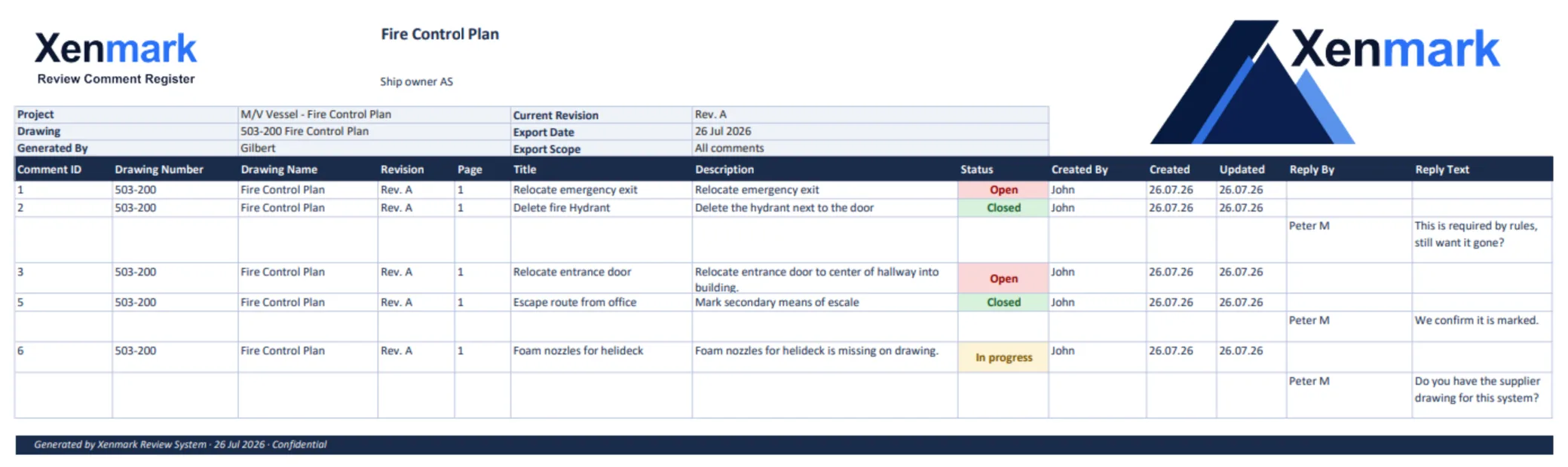
Xenmark exports two matching deliverables: a comment-plan PDF showing the numbered locations on the drawing and an Excel comment register using the same comment numbers. The activity log also records review activity inside the project.
The matching numbers matter because the drawing and the list can be read together. Someone reading comment 18 in Excel can find comment 18 on the PDF without interpreting a separate location description.
Owners can use that export as a practical review record for the project file or as the comment package sent back to the yard or engineering company. It remains a review record, not a class, flag or statutory approval document.
See Maritime Drawing Comment Register.
Does Xenmark replace the owner’s engineering or class process?
No. Xenmark coordinates review of issued PDF drawings; it does not create the technical design, perform engineering verification, determine compliance or issue approval. CAD and naval-architecture work remains with the responsible designers and engineers, while formal class, flag and statutory processes remain in the required systems.
That boundary is especially important when the review begins with observations made onboard. A crew member, superintendent or owner can identify that something appears different from the drawing, but the observation should not be presented as verified design information until the responsible engineering process has evaluated it.
Xenmark is for reviewing and coordinating issued PDF drawings. It does not replace the CAD or naval-architecture software used to create the design, and it does not perform class, flag, statutory or formal regulatory approval.