Superintendents and technical managers are often the people connecting the actual vessel with the drawings held ashore. Xenmark helps structure that handoff: mark the observed difference on the existing PDF, keep clarification with the point, involve the engineering company, and review the revised PDF when it returns.
The observation can start onboard, but the engineering revision still belongs to the responsible designer or engineering company.
How should a superintendent record a vessel drawing discrepancy?
Start from the latest known issued PDF available for the review and mark the exact drawing location where the vessel appears to differ. Use one numbered comment per issue so each point can be answered, tracked and reviewed separately.
A useful comment normally identifies the item, what was observed, and enough location information for someone ashore to understand the point. Depending on the drawing, that might include deck, frame, side, tag number or nearby equipment.
If a measured value matters, put the observed value in the comment text. Xenmark can also measure length, perimeter and area on the PDF after the drawing scale is calibrated against a known dimension. An onboard image can be attached in the reply thread when it helps explain the observation.
The markup is not verified design information. It is structured input for engineering review.
How does this help when drawings have fallen behind the vessel?
The superintendent can build a location-specific list of known discrepancies instead of sending a general request that “the drawings need updating.” Each comment becomes a discrete item the engineering company can assess, question and eventually address in the technical revision.
That is especially useful when several small changes have accumulated over time. The review can show which drawing is affected, where the discrepancy sits, what has been observed and whether more information is still needed.
A structured list does not eliminate engineering verification or a site visit where one is needed. It reduces ambiguity in the first handoff and gives both sides a common reference for the questions that follow.
See the central Vessel Drawing Updates page.
How can a superintendent answer engineering questions without starting another email chain?
Keep each clarification in the reply thread of the comment that triggered it. If the engineer asks which side of a bulkhead an item sits on, the answer stays under that exact drawing point instead of becoming a separate email whose context may be lost later.
The same thread can carry additional detail or an image attachment. Statuses help show which review points are still active and which have been completed, while the activity log records actions taken inside the project.
The engineering company can be invited into the project, and invited reviewers join free. The Project Manager chooses the role according to whether the engineer should only respond/export or also create new review comments.
What should a technical manager check when the revised PDF returns?
Check the returned revision against the earlier review history before starting a fresh review of the new PDF. The earlier comments remain tied to the earlier revision, so the technical manager can see what was originally raised and compare that history with the new issue.
Xenmark does not automatically determine that a comment has been fixed. The reviewer must inspect the revised drawing and decide whether the point was addressed, partly addressed or still needs clarification.
After the earlier points have been checked, review the new revision normally. Any new issues found on the revised drawing should be raised as new numbered comments on that revision.
This distinction preserves a clean record across Rev A, Rev B and later rounds.
Can superintendents use the same workflow for fire control plans?
Yes, the coordination pattern can be used when onboard changes affect a fire control plan or related safety-plan drawing: mark the relevant location on the current PDF, describe what has changed or needs checking, let the engineering company prepare the technical revision, then review the returned PDF.
The boundary is important. Xenmark does not update, approve or certify the fire control plan and does not check SOLAS, class or flag compliance. Formal approval continues through the required process outside Xenmark.
For a dedicated explanation, see Fire Control Plan Review.
How does this fit modification, docking and retrofit work?
Technical managers can use the same review structure when a modification project introduces new equipment, rerouted services or changed arrangements. Existing drawings can be reviewed for known discrepancies, while new modification drawings can be reviewed by the owner, yard, supplier and engineering company as they are issued.
The superintendent’s value is often practical vessel context: what is actually onboard, what access is available, which drawing is affected, and which points still need clarification. Xenmark gives that information a location and a thread rather than turning it into an unstructured collection of emails and screenshots.
See Conversion, Refit & Retrofit Drawing Review.
What record can a superintendent hand back to the owner or office?
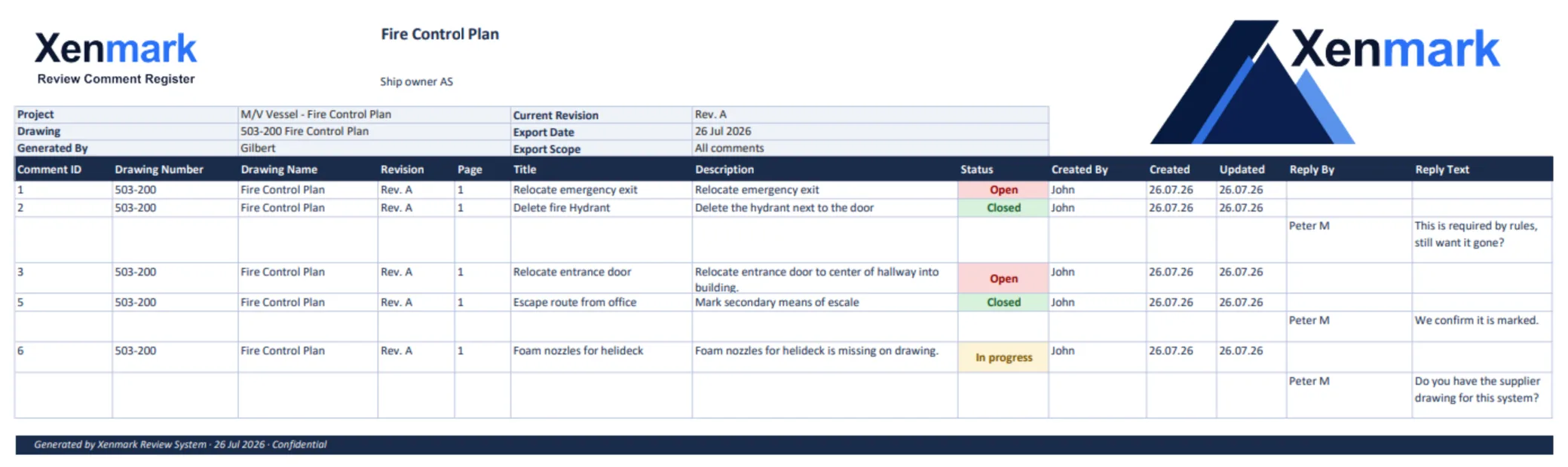
Xenmark can export the review as a comment-plan PDF and matching Excel comment register. Because the comment numbers match, the shore team can read a row in Excel and locate the same point on the drawing.
That can be useful for technical-office follow-up, handing a review between personnel, or sending a structured package to the engineering company. The export is a record of the review and discussion; it is not an engineering verification or formal approval document.
Xenmark is for reviewing and coordinating issued PDF drawings. It does not replace the CAD or naval-architecture software used to create the design, and it does not perform class, flag, statutory or formal regulatory approval.