A ship drawing can be technically detailed and still leave a practical question unresolved. An owner sees an operational issue, a yard sees an installation constraint, and a supplier sees an equipment interface. If each party marks a separate copy, the design team has to reconstruct what everyone meant and which revision each comment refers to.
Xenmark gives those reviewers a shared place to discuss an issued drawing PDF. Place a numbered comment at a specific location, reply under the same point, and keep the discussion with that drawing revision. When the design party issues a newer PDF, the team reviews it as a new revision. Xenmark does not edit the underlying CAD or naval-architecture master.
How do several people review the same ship drawing?
First confirm the drawing number, title and issue you want reviewed. Then bring the relevant people to that issued PDF: perhaps an owner representative, yard engineer, design lead and equipment supplier. Each reviewer should make a point where the question is visible on the drawing, rather than sending “see attached” in an email with no clear location.
A shared review does not remove the project’s own responsibilities. The parties still decide who may comment, who answers technical questions, who can mark a review point Closed, and who controls the official document. What it can remove is ambiguity about which drawing and which location the conversation concerns.
What makes a comment answerable?
“Pump is wrong” is hard to act on. “On drawing M-104, Rev B, the pump shown beside the aft bulkhead appears forward of the installed unit; please confirm which arrangement the next issue should show” gives the responder a location, an observation and a question. If a tag, compartment, frame or related drawing reference exists, include it. If the comment is based on an onboard observation, say who observed it and whether there is a photo or measurement.
That does not make the observer the designer. A precise review comment helps the responsible technical party decide what to investigate. It should not claim that a sketched PDF line is already a verified design revision.
Where can measurement help?
Measurements on a PDF can help reviewers discuss approximate clearances, access or arrangement questions when the drawing scale and tool setup are appropriate. They are context for a conversation, not substitutes for controlled dimensions, a site survey, engineering calculations or the designer’s authoritative model. Where a decision depends on exact dimensions, the responsible party must verify them from the right source.
How do owner, yard, engineer and supplier comments stay together?
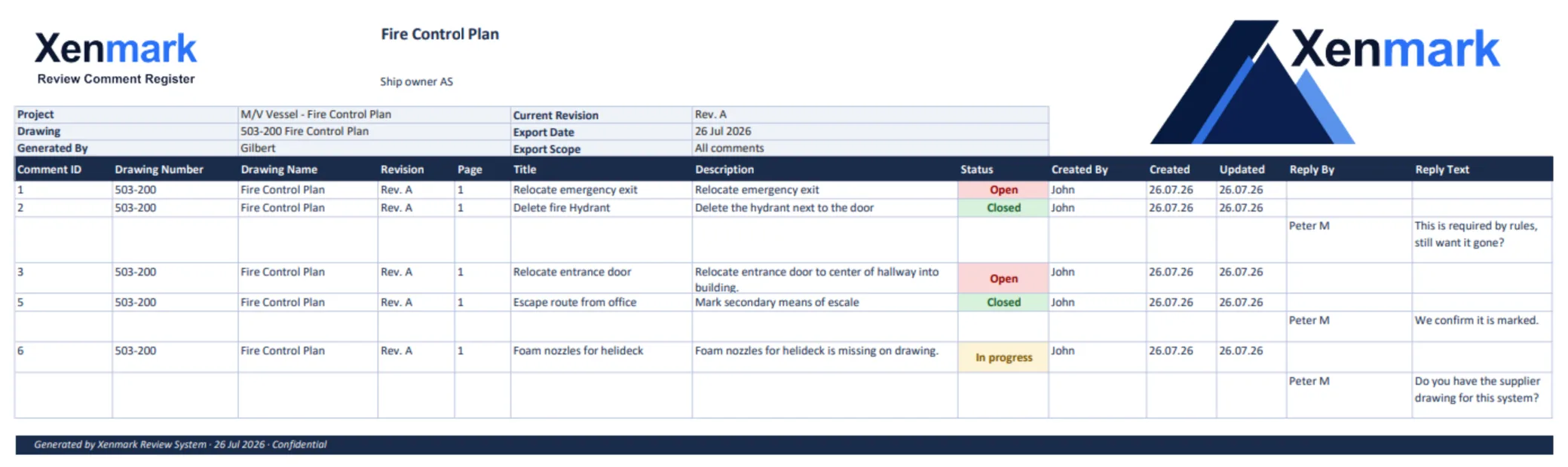
Keep one issue per numbered review item and its replies. For a supplier interface, the owner might explain the operating requirement, the supplier might supply equipment data, and the yard might explain installation access. The design party can ask for clarification in the same thread. Review statuses—Open, In progress, Closed—describe how the team is managing the review item; they do not grant technical or formal approval.
Illustrative example: On a machinery arrangement, an owner comments that maintenance access to a valve appears too narrow. The yard replies with an installation constraint; the equipment supplier supplies the required service envelope; the engineer decides whether the controlled drawing needs a technical revision. The example illustrates collaboration, not a claim about a customer or a universal design standard.
What happens when a new revision arrives?
Use the drawing number and revision, not the filename alone, to identify the returned issue. Earlier comments remain with the earlier PDF. Reviewers inspect the new issue, decide manually what happened to earlier points and raise any new concerns on the new PDF. Xenmark does not automatically transplant old comments onto new geometry or decide whether a change is correct.
The guide How to Review Revised Ship Drawing PDFs gives a step-by-step second-round method. If the question began with a difference found onboard, the Vessel Drawing Updates page covers the complete vessel-to-engineer handoff.
What can the review team hand over?
After a round, an annotated PDF and an Excel comment record can help another party understand the numbered locations, questions and responses. The team should retain the original issued drawing identity and revision context. A review export is evidence of a conversation; it is not the approved technical drawing or a class/flag decision.
This workflow can apply to general arrangements, machinery and piping drawings, equipment foundations and other issued ship PDFs. Specialist pages explain where the review context changes: Fire Control Plan Review adds a safety-plan boundary, Newbuild Drawing Review addresses package rounds, and Conversion, Refit & Retrofit Drawing Review addresses uncertain existing conditions and project interfaces.
How should the review start when organizations already have their own registers?
Do not discard an owner’s or yard’s existing identifiers without a mapping. Agree which document is the current review reference and how external comment numbers will be carried into the discussion. A point may need both its project register number and its Xenmark review number so that replies can be traced in either context. Record the drawing revision beside both. This is especially important when a supplier answers through its own transmittal or when a yard issues a new drawing package midway through review.
If there are conflicting comments, keep them as distinct questions until the responsible parties resolve the conflict. An owner may ask for improved operating access while a supplier specifies a service envelope and a yard flags an installation constraint. The shared PDF makes their locations visible; a designer or project decision maker still evaluates the competing requirements. A Closed review item should reflect that decision, not be used to hide disagreement.
What should reviewers check before sending the record onward?
Before exporting, scan for unassigned questions, comments that lack a drawing location, replies that say only “done,” and points whose source revision is unclear. Confirm that the output represents the intended review round and that any attachments or evidence needed by the recipient are included through an appropriate channel. A clean export cannot repair an ambiguous comment, so quality starts when the point is raised.
For a new participant joining later, the record should answer: what was the issued drawing, what did each organization see, what did the technical party answer, and what remains to be checked on the next issue? If the recipient cannot answer those questions without a separate explanation, strengthen the comments before handover.
When project files are confidential, agree how photographs, supplier documents and exported registers may be shared. The drawing-linked comment should identify the evidence and where an authorized reviewer can find it, even if the file itself must stay in a controlled system. An accessible review record is still subject to the owner’s permissions and contractual obligations.
For a useful first review round, appoint a person to check that every comment names the right drawing issue and asks an answerable question before the package is sent onward. That person need not resolve the technical points. A short quality pass can separate duplicate comments, identify missing evidence and keep owner preferences distinct from observed discrepancies. The design party then receives a coherent set of questions rather than a pile of unrelated marks.
Related maritime workflows
- Vessel Drawing Updates for an onboard discrepancy that needs an engineering handoff.
- Fire Control Plan Review for a safety-plan-specific review boundary.
- Newbuild Drawing Review and Conversion, Refit & Retrofit Drawing Review for project-wide rounds.
Related Use Cases
Drawing Review, PDF Markup, External Drawing Review, Revision Review and Drawing Measurement & Scale Calibration explain the reusable methods behind this maritime workflow.
Related Teams
- Ship Owners — raise owner-side operational and vessel-condition questions.
- Shipyards — respond to installation and package-review interfaces.
- Superintendents / Technical Managers — identify onboard discrepancies.
- Marine Engineering Companies — interpret questions and prepare technical revisions.
- Equipment Suppliers / Marine Vendors — clarify equipment and interface details.