During a newbuild, a project team reviews many drawing packages over several rounds. An owner representative may question an operational arrangement, a supplier may identify an equipment interface, and the yard or designer may need to revise an issued drawing. Each point is easier to answer when it is tied to the correct drawing, location and revision.
Xenmark provides a shared PDF-review layer for those conversations. Reviewers can comment on issued drawings, reply at each point, track review status and examine later PDFs. The yard or appointed design party remains responsible for technical authoring and for its own document-control and formal approval process.
What is an owner–yard drawing review round?
A typical round begins when a yard or design party issues a drawing or package for review. Owner representatives and other agreed participants inspect it and raise questions. The responsible party replies, clarifies or makes a technical revision. The next issue is then checked against the earlier points and reviewed for new concerns. The contract and project procedures decide who is authorized to submit, respond and accept; the sequence here is an example, not a universal rule.
One comment should point to one identifiable location or issue. “Please review accommodation layout” is too broad to track. “On GA-201 Rev C, Deck 4, the access route beside the service door appears to conflict with the equipment service area; please confirm the intended clearance” gives the design team a question it can investigate. Any measurement on a PDF is review context, not the authoritative design dimension.
How should drawing packages be organized?
Keep drawing number, title, discipline, revision and issue date visible. A package may contain a general arrangement, machinery arrangement and supplier interface drawings; each has its own identity and review points. Avoid collapsing an entire package into a single “drawing comment” if different authors or decisions are involved.
Illustrative package: GA-201 Rev C shows access around an equipment room; M-104 Rev A shows the pump arrangement; V-07 Rev 2 is a supplier interface drawing. The owner comments on access on GA-201, the supplier answers a connection question on V-07, and the yard coordinates an issue on M-104. The numbers are illustrative and do not describe a real vessel.
How can owner representatives and consultants review together?
Bring the people who genuinely need to comment to the issued PDF, with access aligned to the project’s permissions. A consultant can raise a location-specific point while the owner representative explains the operational requirement. Replies under the same point make it clearer whether the two observations support each other or ask different questions.
If comments conflict, a human decision maker under the project process decides which requirement controls. The review record should retain the reasoning and the issued drawing identity. Xenmark can make the exchange visible; it does not adjudicate the engineering or commercial decision.
Where do suppliers and engineering companies fit?
Suppliers can provide equipment data and answer interface questions; engineering companies can interpret design implications and author changes within their appointment. A supplier drawing comment should reference the relevant ship drawing when the interface crosses documents. Do not assume that every participant has the same authority or that a supplier’s reply changes the yard’s controlled master automatically.
How do you check the next issue?
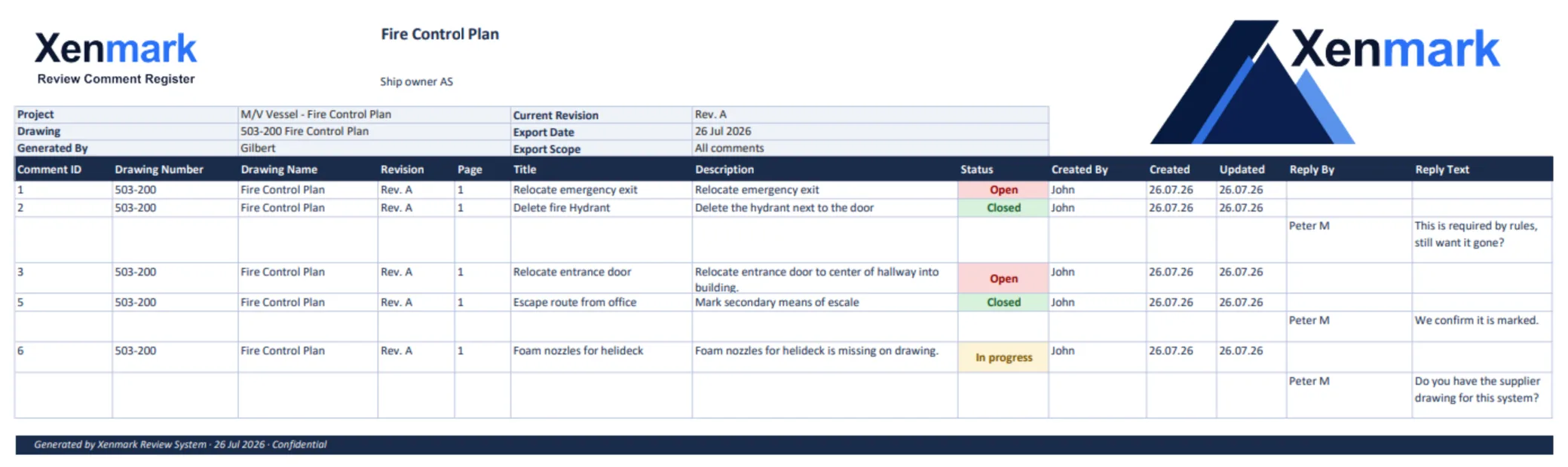
Confirm the new drawing number and revision. Earlier comments remain with the earlier PDF. Check each earlier question against the new issue, then look for changes that create new concerns. Record the reviewer’s conclusion and raise fresh points on the new revision. A PDF and Excel review export can be shared as a comment record.
Formal plan approval is a separate process. For example, DNV describes its own newbuild plan-approval service and eApproval portal. That does not make Xenmark a class submission or approval system.
For a single issued drawing, see Ship Drawing Review & Markup. For a stakeholder-heavy general arrangement, see Reviewing General Arrangement Drawings With External Stakeholders. For recurring numbered points, see Maritime Drawing Comment Register.
How can a project avoid losing context between package issues?
Keep a package index that names every drawing in the review round and its issue. When the yard sends a response, match it to the same drawing and point number. If only one sheet in a package changes, make that explicit; do not imply the entire package was reissued. A short transmittal summary can say which drawings were revised, which were returned for information and which remain under review.
For the illustrative GA-201/M-104/V-07 package, the next round might bring GA-201 Rev D and M-104 Rev B while V-07 remains at Rev 2. The owner needs to check the changed GA access and pump arrangement, but also confirm that the supplier interface assumption on V-07 still holds. A package index makes that relationship visible without copying the same comment into every file.
What if two reviewers use different acceptance language?
An owner representative may say “acceptable for operations” while a designer says “comment resolved” and a yard says “ready for construction.” Those statements may refer to different scopes. Use the project’s own documented review and approval terminology, and keep Xenmark’s Open/In progress/Closed status limited to the comment conversation. If a formal class or contract approval exists, its evidence belongs in the appropriate separate channel.
When the project hands a review round to the next party, note what was checked, by whom, and against which issued revision. That is more informative than a generic “all comments closed” summary, especially when later packages depend on supplier data or another discipline’s drawing.
When does a supplier question become a design issue?
Suppose a vendor drawing identifies a service envelope that conflicts with a GA access route. The supplier can provide its equipment data, but it should not be expected to decide the vessel’s overall arrangement alone. The owner can explain how the access is used, the yard can assess installation conditions, and the responsible designer can decide the controlled drawing change. Keeping the comment near the conflicting GA location helps each party contribute without blurring accountability.
Before a package is handed to the next round, make sure the recipient knows whether each file is for review, information, technical authoring or formal approval. The same PDF can travel through several channels, but its issue and purpose must remain clear. A shared comment record can make the discussion easier to trace; it does not decide the contractual status of the document.
Related maritime workflows and guides
Ship Drawing Review & Markup explains single-drawing collaboration; Maritime Drawing Comment Register covers the portable response list; Review Ship Drawings Before Class Submission explains the later internal/formal boundary. Continue to Reviewing General Arrangement Drawings With External Stakeholders for a GA-specific method.
Related Use Cases
External Drawing Review, Drawing Comment Tracking, Revision Review, and Drawing Comment Register & Review Deliverables explain the shared methods behind a newbuild round.
Related Teams
- Ship Owners — raise owner-side operational questions.
- Shipyards — manage the package issue and response loop.
- Marine Engineering Companies — interpret and revise technical drawings.
- Equipment Suppliers / Marine Vendors — clarify equipment interfaces.