Ships change through operation, repair, replacement and modification. A pump may move, a pipe route may be altered, or equipment may no longer sit where an older drawing says it does. Before a design party can revise that drawing, someone needs to describe the difference clearly enough to investigate.
Xenmark helps the vessel and engineering sides work around the issued drawing PDF. The vessel side marks an observation at the relevant location and adds context. The responsible engineering or design party evaluates it and prepares any technical revision in its normal authoring system. When a revised PDF is issued, the team reviews the new issue and retains the discussion.
Where should a vessel drawing update start?
Start with the latest known issued PDF and identify it by drawing number, title and revision. If the team cannot confirm whether that issue is current, record the uncertainty instead of silently treating it as approved. A known reference gives the vessel, owner and engineer one object to discuss, even when everyone agrees that parts of it may be outdated.
For each discrepancy, record where it is on the drawing and where it is onboard. Depending on the drawing, a deck, compartment, frame, equipment tag, line number or adjacent feature can help. Avoid a single broad comment such as “update machinery room drawing”; it gives the design party no reliable starting point.
How should an onboard difference be recorded?
Describe the observed condition first. Then state the question or desired outcome separately. For example: “The installed pump appears on the aft side of the foundation; this issued drawing shows it forward. Please verify the current arrangement and advise what information is needed for a drawing revision.” That is more useful than drawing a new pump symbol on the PDF and declaring it final.
One observation per review item makes replies and later checks manageable. Attach or reference supporting information: a dated photo, equipment model, marked location, field note or known measurement. Say whether a dimension is measured, estimated or taken from another controlled document. Do not ask the software or a non-design reviewer to decide whether the observed configuration is technically acceptable.
Illustrative example: An owner representative notices that a replacement pump and its nearby isolation valve no longer match an issued machinery arrangement. On the PDF, the reviewer places one comment at the pump and a second at the valve. Each comment states what is observed, what evidence exists and what needs clarification. The engineer replies that the pump location is clear but asks for a photograph of the valve tag before deciding how to revise the associated drawing. This is a teaching example, not a Xenmark customer project.
What does the engineering company need to respond?
A concise handoff can include:
- Vessel or project identifier and a contact person.
- Drawing number, title, issue/revision and the source of the reference PDF.
- Exact drawing location and corresponding onboard area.
- What is observed, what the drawing shows, and what remains uncertain.
- Photos, equipment data or field dimensions with their source.
- The operational or project reason for raising the issue.
- The requested next step: clarification, survey, technical assessment or revised drawing.
This is an information checklist, not a universal engineering or approval requirement. The responsible party may request more evidence, involve other disciplines, or decide that a different document should be revised.
Who actually changes the technical drawing?
The responsible engineer, designer or other appointed technical author changes the controlled drawing in its normal design environment. A PDF comment can indicate the location of a problem or show an intended outcome; it cannot establish the technical validity of a replacement arrangement. A redline may be a valuable input, but it is not automatically the authored and checked final drawing.
The distinction matters during vessel modifications because an apparently small move can have interfaces with access, supports, piping, cables, safety information or other drawings. The appropriate people determine the scope and checks for the particular project.
What happens when the revised PDF comes back?
Confirm the new drawing number and revision. Review the earlier comments on their original PDF, then examine the returned revision as a new issued drawing. For each earlier point, a human reviewer decides whether it appears addressed, partly addressed, unresolved, in need of clarification or no longer relevant. Also scan the revised area for new issues rather than looking only at old comments.
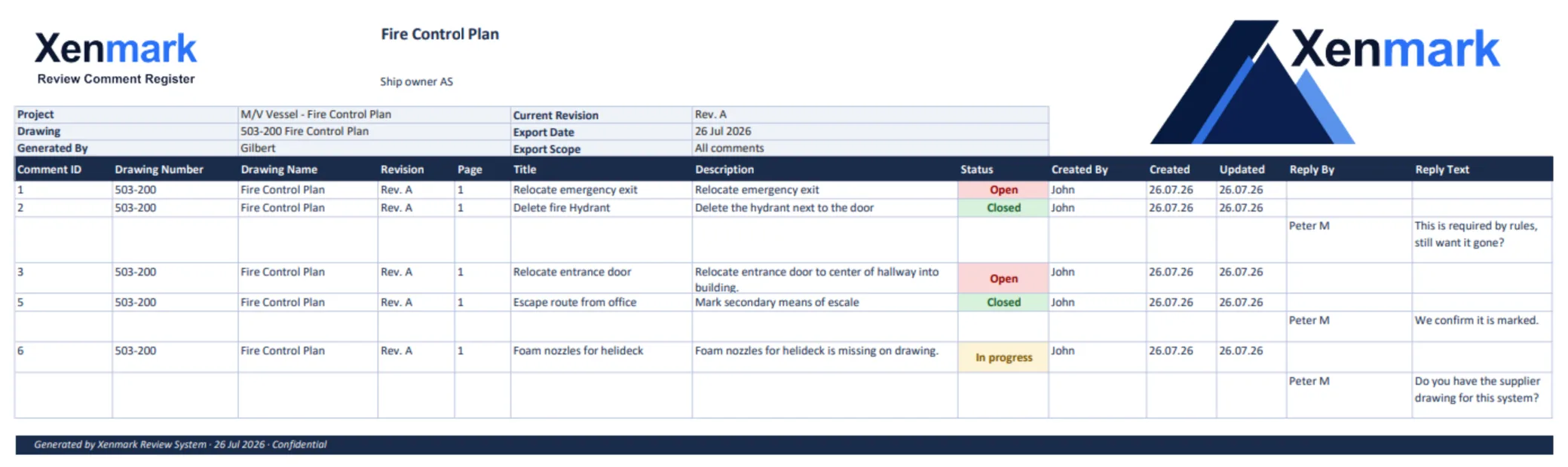
Xenmark’s review statuses are Open, In progress and Closed. Those statuses describe the review conversation. They do not mean that the design has received class, flag or statutory approval. Earlier comments remain attached to their original revision; Xenmark does not automatically transplant them or determine that the new geometry fixed them.
Continuing the illustrative example: The next machinery arrangement shows the replacement pump in the observed position. The owner reviewer checks it and marks the pump question addressed in a separate review worksheet. The valve tag still differs from the onboard photograph, so the reviewer raises a new or continuing question against the new PDF. The team does not erase the earlier issue to make the revision look complete.
What record should the team retain?
Keep the issued drawing and its revision identity, the review comments and replies, the team’s disposition of earlier points, and the exported review record where useful. A matching annotated PDF and Excel list can make a handoff more portable. The vessel owner’s document-control process decides where these records belong and which drawing is authoritative.
For some changes, a separate class, flag or other formal review may apply. The relevant responsible parties determine that for the vessel and project. Xenmark can help people review the issued PDFs around that process; it does not replace the formal channel. An IMO documentation table describes a specific as-built construction-drawing requirement for ships in its stated scope. It should not be read as a universal update rule for every vessel drawing.
How can the team decide what to work on first?
Do not assume that every observed difference has the same urgency or the same technical consequence. A superintendent can record the observation and its context, while the responsible parties decide priority through the vessel’s safety, operations and project procedures. A useful issue list can distinguish “needs immediate technical assessment,” “needs additional onboard confirmation,” “ready for routine drawing update” and “belongs to a separate modification package.” Those are planning categories, not Xenmark statuses or compliance determinations.
If several related discrepancies are found, keep each as a separate review item and group them in the handoff. This lets the engineering company see shared drawings, equipment interfaces and possible dependencies without losing the identity of each point. The guide How Ship Owners Can Scope Several Small Drawing Updates at Once shows one way to prepare that package.
An owner-side review can also state what it does not know. “Photograph confirms the pump body, but connection routing is not visible” gives the engineer a specific evidence gap. It is more actionable than a complete-looking markup based on an assumption. The record should preserve the unknown until someone verifies it or the technical party identifies another acceptable source.
That evidence gap can become its own assigned question: who will inspect the connection, what photograph or survey is needed, and which drawing issue will be reviewed afterward? Recording the next action keeps an uncertain point from being mistaken for a completed update.
What would a complete return look like?
For the illustrative pump issue, a useful return is more than “drawing changed.” It identifies the issued Rev B, states which source information was used, answers the original pump and valve questions, and leaves a clear path for the owner to check the new PDF. If the valve identity is still uncertain, the engineer can state the open assumption and request further evidence. The reviewer then records a specific outcome for each point rather than closing the entire package because one drawing was reissued.
What kinds of drawing updates fit this workflow?
The same communication pattern can help when an equipment location differs, an access arrangement changed, a route or foundation is questioned, a supplier interface needs clarification, or a safety-plan location must be checked. The technical content and approval route differ by drawing. Use Fire Control Plan Review for that specialized plan, Conversion, Refit & Retrofit Drawing Review for project-wide modification interfaces, and How to Review Revised Ship Drawing PDFs for the second-round method.
Outside sources on this page were checked on 23 September 2026.
Related maritime workflows and guides
Ship Drawing Review & Markup explains multi-party PDF comments; Fire Control Plan Review addresses a specialist plan; Conversion, Refit & Retrofit Drawing Review follows project interfaces; and Maritime Drawing Comment Register organizes the record. Continue with How to Review Revised Ship Drawing PDFs, Owner–Engineer Drawing Review During Vessel Modifications, How Ship Owners Can Scope Several Small Drawing Updates at Once, or Redlines vs a Structured Comment Register for a specific next task.
Related Use Cases
Revision Review, Drawing Measurement & Scale Calibration, Drawing Comment Register & Review Deliverables, and Drawing Review Handover & Project Archive explain the sector-neutral methods used around this vessel workflow.
Related Teams
- Ship Owners — organize the owner-side update request and drawing record.
- Superintendents / Technical Managers — turn onboard observations into precise questions.
- Marine Engineering Companies — clarify the evidence and author the technical revision.