A modification project begins with a vessel that already exists. The available drawings may not describe every change made over its working life, while the new design has to interface with real equipment and spaces. That uncertainty should be made visible before it is mistaken for a settled design fact.
Xenmark helps owners, yards, engineering companies and suppliers coordinate review around issued PDF drawings. The team can mark observed differences, ask precise questions, discuss interfaces and check the next revision. The responsible technical party still authors and verifies the design change; the owner's controlled documents and any applicable formal approvals stay in their own processes.
Why do modification drawings require a different review?
On a newbuild, the project starts from drawings that are being developed for the new vessel. On a refit or conversion, the team also has to reconcile old documentation with actual onboard condition. A replacement unit may have a different footprint, a cable route may have been altered, or a foundation may not match the drawing available to the designer. Several organizations can each know one part of the answer.
The review should distinguish existing condition, proposed design, and issued revision. If those three are collapsed into one marked-up PDF, an observer’s field note may be mistaken for a verified solution.
Should the team start with the existing drawings?
Yes—use the latest known issued drawing as a common reference and state what is uncertain about it. Record vessel, drawing number/title, revision and source. Then mark each observed difference at its location and add photographs, tags, work records or field dimensions with their provenance.
Illustrative example: A refit team plans to replace a pump. The current machinery arrangement shows the old pump and valve on one side of a foundation, but a vessel-side inspection finds the valve in a different position. The owner records that observation. The supplier provides replacement-unit information. The yard raises an access concern. The engineer uses those inputs to decide what must be assessed and which drawing revisions to issue. This is an illustrative workflow, not a customer case or an approved design.
How do yard and supplier interfaces stay clear?
Keep each interface question attached to the relevant issued drawing or cross-reference. A supplier may answer a nozzle or equipment-envelope question; the yard may answer an installation or access question; the engineer may need to coordinate the two before revising the design. Use drawing and item identifiers where available so the team is not left with “that connection” in a long email chain.
The project’s responsible parties decide who may resolve each kind of point. A comment marked Closed by a reviewer should not be interpreted as proof that an installation or technical design has passed every required check.
Who makes the revision, and how is it checked?
The appointed design or engineering party prepares the controlled technical revision in its normal authoring system. When the new PDF arrives, reviewers identify its drawing number and issue, check earlier observations and interface questions, and inspect for new concerns. Earlier comments remain on the earlier PDF; the team records its conclusion about the new issue rather than relying on automatic matching.
For work spanning several disciplines, the review record should make relationships visible without claiming that one annotated PDF is the complete project model. A piping drawing, machinery arrangement and supplier drawing may each need separate issued revisions and their own checks.
What should be retained at project handover?
Retain the known drawing baseline, field observations and evidence, the engineer/yard/supplier replies, issued revised PDFs and a review record that explains which points were handled. The vessel owner’s document-control process determines the authoritative final files and their onboard/shore archive. Xenmark can provide a portable annotated PDF and Excel review record.
For some modifications, formal approval or survey steps may apply. DNV’s operational-phase documentation service is an example of a separate class channel; the requirements for a specific project must be determined by the responsible parties.
For an individual onboard discrepancy, see Vessel Drawing Updates. For the two-sided owner–engineer handoff, see Owner–Engineer Drawing Review During Vessel Modifications. For dense technical PDFs, see Reviewing Piping and Machinery Drawing PDFs Across Revisions.
How should uncertainty be carried through the project?
An older drawing may be the best available reference without being a reliable description of every onboard detail. Mark the parts that have been confirmed by survey or other evidence and the parts that remain assumptions. If a design decision depends on an unconfirmed condition, the review point should say what needs to be checked and who is responsible. Closing the point simply because construction is moving forward can make the next revision harder to interpret.
For the illustrative pump replacement, the owner may confirm the present pump location but not the exact suction-connection geometry. The engineer can progress an assessment while requesting a targeted survey or photograph before finalizing the piping interface. The yard and supplier can then comment against the actual issued drawing and the documented assumption, rather than inferring what an unlabeled markup meant.
Which records belong at handover?
The answer depends on the owner’s system, but a clear handover distinguishes current issued drawings from earlier review material. The record should identify the final drawing numbers and revisions, the source observations that led to change, the reviewed interfaces, the status of any unresolved questions and where the formal approval or survey evidence is stored if applicable. A PDF/Excel review export can support that narrative; it is not itself the final vessel documentation.
Do not describe every modification as having the same approval or survey route. DNV’s alteration service is one concrete example of a formal process; the responsible parties must assess the actual vessel, flag, class and work scope. A strong review page helps the team prepare clear information for that decision without claiming to make it.
How is this different from a routine drawing update?
A single discrepancy may concern one drawing and one engineering response. A refit can connect equipment, structure, access, piping and supplier information over several issues. Manage those interfaces together: record which issue affects each drawing, who must answer it, and what the project team must hand over. For the detailed vessel-side capture method, see Vessel Drawing Updates.
Related maritime workflows and guides
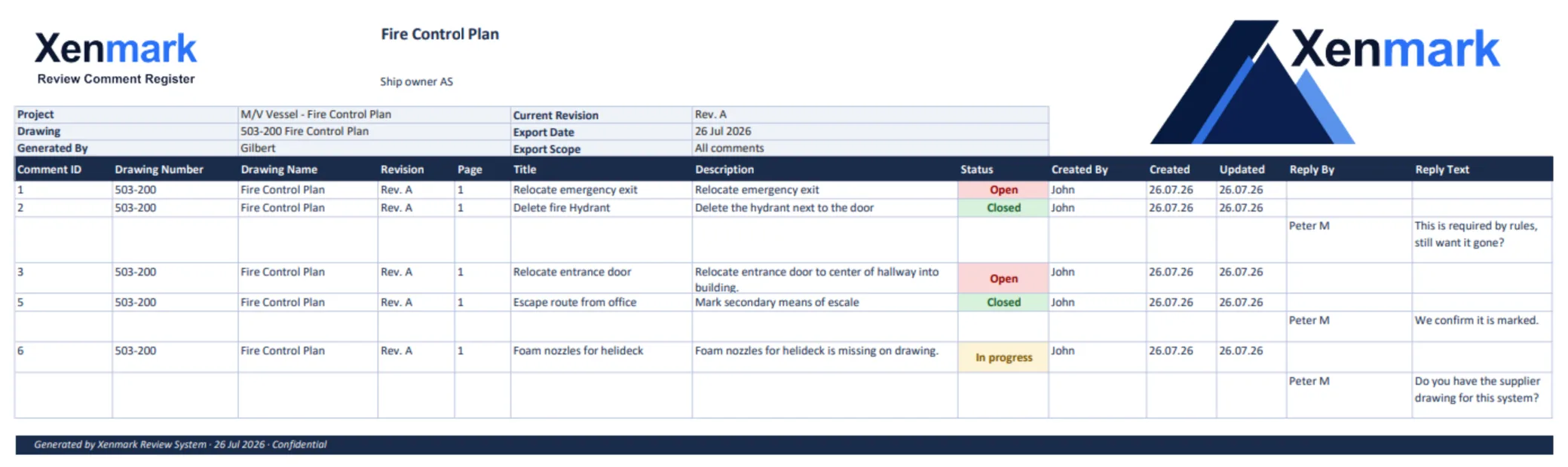
Vessel Drawing Updates covers individual discrepancies; Ship Drawing Review & Markup covers the issued-PDF conversation; Maritime Drawing Comment Register organizes the record; and Fire Control Plan Review addresses a specialist plan. The Owner–Engineer Drawing Review and Piping and Machinery Drawing PDFs guides explore the handoff and dense-drawing detail.
Related Use Cases
External Drawing Review, Revision Review, Drawing Measurement & Scale Calibration, and Drawing Review Handover & Project Archive explain the generic supporting workflows.
Related Teams
- Ship Owners — set the owner-side modification question.
- Shipyards — identify installation and package interfaces.
- Superintendents / Technical Managers — confirm observed onboard condition.
- Marine Engineering Companies — assess and author controlled revisions.
- Equipment Suppliers / Marine Vendors — supply equipment and interface information.