BIM, VDC and MEP coordination teams often work in model-based environments, but many owners, contractors, specialists and suppliers still review issued drawing PDFs. Xenmark gives those stakeholders a PDF review layer while the coordination team keeps models and model-native issues in the tools designed for them.
Why would a BIM team need a PDF review layer?
Not every reviewer needs or has access to the model environment. Owners, suppliers, site teams and external consultants may receive only the issued drawing PDF but still need to point to a specific location and raise a coordinated comment.
Xenmark lets those reviewers work on the issued representation while the BIM/VDC team continues to manage the model in its normal authoring and coordination tools.
Which BIM and MEP drawing issues fit a PDF review?
Xenmark fits visual coordination questions on issued MEP drawings: routes, equipment locations, service zones, penetrations, access requirements, maintenance clearances, risers, plant-room layouts and interfaces with architecture or structure.
The review point can identify what needs checking, but Xenmark does not calculate system performance, run clash detection or make the engineering decision. The responsible MEP designer or contractor still evaluates the issue.
Can external reviewers participate without learning BIM software?
Yes. They review the issued PDF in a browser. That can be useful for owner representatives, specialist vendors or site personnel who need to comment on the drawing but do not need access to the model-authoring environment.
The Project Manager can choose whether a reviewer may create new comments or only reply and export, using Xenmark’s Editor and Participant roles.
How can several MEP disciplines comment on the same area?
Invite the relevant mechanical, electrical, plumbing, fire-protection or specialist reviewers to the same issued PDF. Each discipline can place a numbered comment at the exact interface it needs to discuss.
That makes spatial overlap visible to the human reviewers and keeps the conversation around each point together. Where the project also uses model-based coordination, Xenmark complements rather than replaces that process.
How can measurements support an MEP comment?
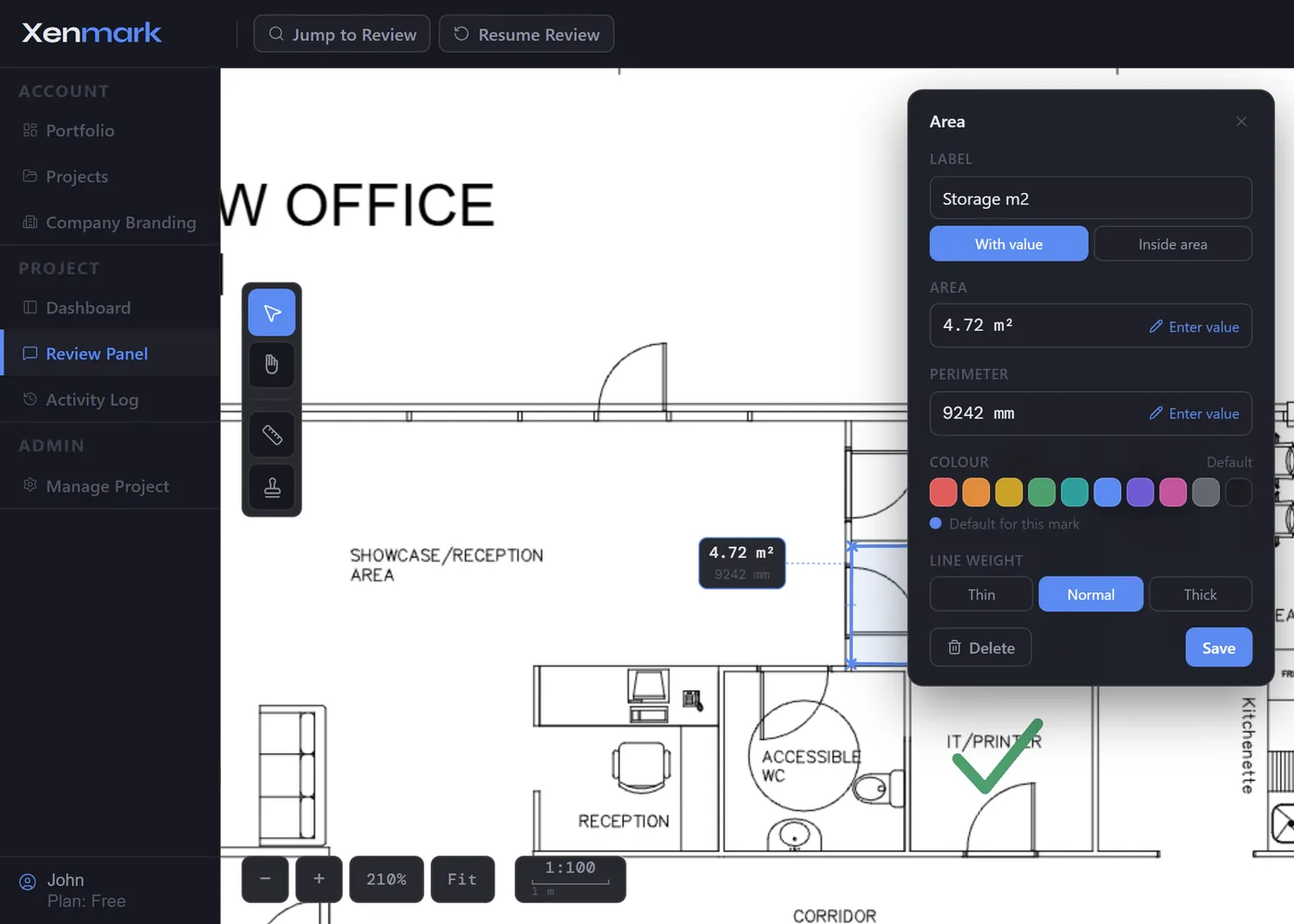
After calibrating the PDF scale against a known dimension, reviewers can measure length, perimeter or area on the drawing. A measured value can help explain a clearance or route question during the review.
Treat that measurement as a drawing-review aid. It is not a substitute for model geometry, verified site dimensions, fabrication tolerances or engineering calculation.
How does revision history work with model-derived drawings?
When the BIM team issues a new drawing PDF, upload it as the next revision of that drawing. Comments from the prior issue stay with the prior PDF, preserving the context of that review.
Xenmark does not geometrically compare the model-derived sheets or automatically move comments to a new view. The coordinator and reviewers still inspect the new issue and decide whether the prior comment was addressed.
Where does Xenmark sit beside a model-based issue workflow?
Use the model-native platform for issues that need object references, viewpoints, clash results, BCF exchange or automated coordination. Use Xenmark when the person raising or answering the point is working from the issued PDF and the drawing sheet is the natural shared reference.
On some projects both can exist. A BIM/VDC coordinator may receive a PDF comment from an external reviewer, investigate it in the model, and then return the resulting drawing revision through the normal issue process.
How can BIM/VDC teams avoid duplicate issue registers?
Define which system owns which kind of issue. If a point must be managed in the formal BIM issue environment, keep that platform as the authoritative issue record and use Xenmark only where the PDF review genuinely adds value.
For an external drawing review that is self-contained, the Xenmark comment and export may be enough. For a model issue requiring object-level coordination, move the authoritative tracking to the BIM system.
Clear workflow ownership is more important than forcing every review conversation into one tool.
What should an MEP comment contain to reduce clarification cycles?
A useful MEP review point should identify the exact location, the affected service or equipment, and the question the responsible party needs to answer. Where appropriate, include a tag, level, grid, room or measured value rather than relying on a vague note such as “move this.”
One issue per comment is usually clearer than combining several interfaces in one thread. That lets different disciplines answer their own point and makes the later revision easier to check.
Does Xenmark replace clash detection, BIM issue management or formal MEP coordination?
No. Xenmark does not federate models, run clash tests, coordinate model objects, exchange BCF or manage BIM deliverables.
Its role is specifically the PDF review edge of the workflow: people who receive drawings can mark what they see, the BIM/VDC team can clarify the point, and the next issued PDF can be reviewed without losing the earlier conversation.
Xenmark is for reviewing and coordinating issued PDF drawings. It does not replace the CAD, BIM, engineering or design-authoring software used to create the design, and it does not perform formal technical, contractual, statutory or regulatory approval.