Architects and engineering consultants create drawings in specialist authoring environments, but clients, contractors, operators and external specialists often review the issued PDF. Xenmark provides a separate review layer while the design team keeps control of CAD, BIM, calculations and document release.
This page is for architects, design teams and engineering consultants who want clearer feedback on issued drawings, carried through each revision.
How can a design team collect comments on an issued drawing?
Upload the issued PDF and invite the people who need to review it. Reviewers place numbered comments directly on the relevant room, detail, element or note, so the design team can see both the written feedback and the location it refers to.
That is useful when the reviewer does not work in the same authoring tool as the architect. The reviewer only needs the issued PDF and a browser; the architect continues to design in the software already used by the practice.
How can multidisciplinary comments stay organised?
Use one shared issued PDF and give every point its own numbered thread. Structural, mechanical, electrical, architectural or specialist reviewers can comment in the same workspace without creating several unrelated copies of the drawing.
The engineering team can answer individual points, use statuses to follow the review, and rely on the comment number as a stable reference in meetings or follow-up correspondence.
How should design teams handle client comments that require professional judgement?
Treat the comment as review input, not as an automatic instruction to change the design. A client or owner can identify a preference, concern or operational requirement, but the architect and responsible consultants still evaluate the technical, contractual and regulatory implications.
The thread can capture the clarification and the decision made during review. The actual drawing change is then made in the practice’s normal CAD/BIM authoring environment.
How does Xenmark fit the team’s normal design process?
It sits outside the authoring environment. The engineer continues to use CAD, BIM, calculation, analysis and document-control tools as required. Xenmark is where the issued PDF is reviewed by the people who need to comment on it.
When a comment requires a design change, the responsible engineer makes that change in the controlled engineering workflow. The revised drawing is then reissued as a PDF and can be uploaded for another review round.
What happens when the design team issues the next revision?
Upload the next PDF into the same drawing slot. Comments from the earlier issue stay with that earlier revision, preserving the context in which they were raised.
The design team or reviewer can use the prior history while checking the new issue. Xenmark does not automatically carry old pins onto the new drawing or determine whether a comment has been resolved. That review remains a human design decision.
How do engineering teams keep Xenmark separate from quality-control sign-off?
Use Xenmark for collaborative review, but keep internal checking, verification, approval signatures, design calculations and controlled release in the firm’s established quality-management process.
A Xenmark status can help the review team understand whether a discussion is still active, but it should not be presented as equivalent to an engineer’s formal check, design approval or document release status.
For professional engineering firms the distinction matters: the collaborative comment trail and the controlled engineering record serve different purposes even when they refer to the same drawing.
Can the design team send a conventional comment register?
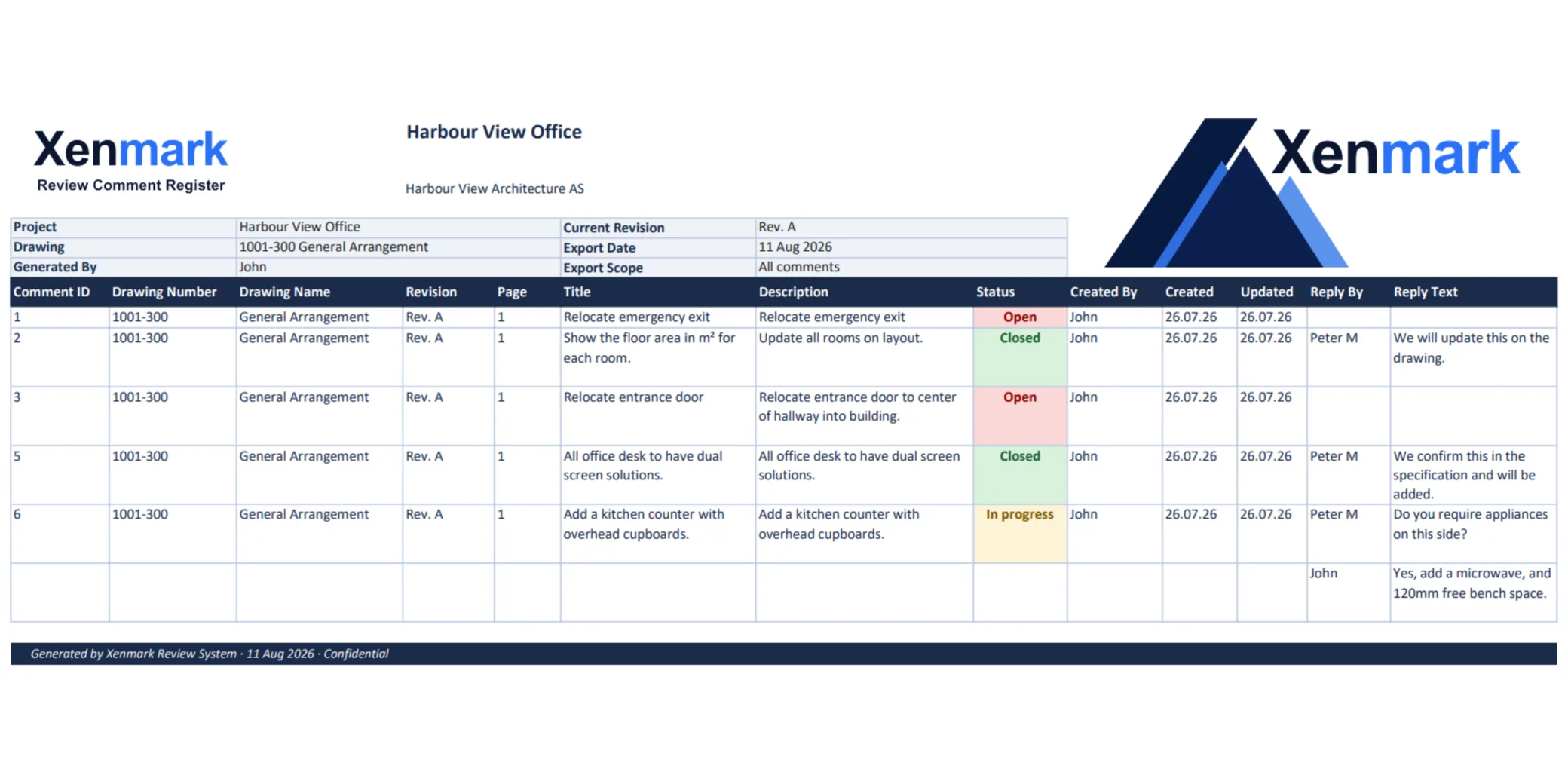
Yes. Xenmark can export the marked-up PDF and a matching Excel register. The same comment number appears on the drawing and in the spreadsheet, so a client or consultant can move between the visual and tabular versions of the review.
This can be useful where an organisation expects an Excel schedule of comments but the design team wants to avoid maintaining a separate spreadsheet manually during the review.
Does Xenmark replace BIM coordination, a CDE or design software?
No. Xenmark does not author models, manage federated BIM, detect clashes, control formal drawing issue status or replace the project CDE. It is a browser-based PDF review workspace.
The intended boundary is simple: the design team issues a PDF, reviewers comment on that PDF, the architect or consultant makes the design change in the proper authoring tool, and the next issued PDF can be reviewed as another revision.
Which design-review stages are a good fit?
Xenmark is most useful at stages where an architectural drawing has been issued as a PDF and needs focused human review: client review, consultant coordination, contractor input, specialist review or a check of the next drawing revision.
It is less suitable as a substitute for live design collaboration inside the BIM model or for formal project workflows that depend on contractual status codes and transmittals. Xenmark complements an architect’s design stack rather than replacing it.
The value is strongest at the edge of the design team, where people need to comment on the drawing but do not need to edit the model.
Xenmark is for reviewing and coordinating issued PDF drawings. It does not replace the CAD, BIM, engineering or design-authoring software used to create the design, and it does not perform formal technical, contractual, statutory or regulatory approval.