Asset owners and operators receive drawings from designers, engineering firms, contractors and suppliers throughout the life of an asset. Xenmark gives the owner side a structured review layer for issued PDFs without requiring operations staff to work inside the designer's authoring environment.
This page covers facility and building operators, infrastructure owners and industrial plant owners.
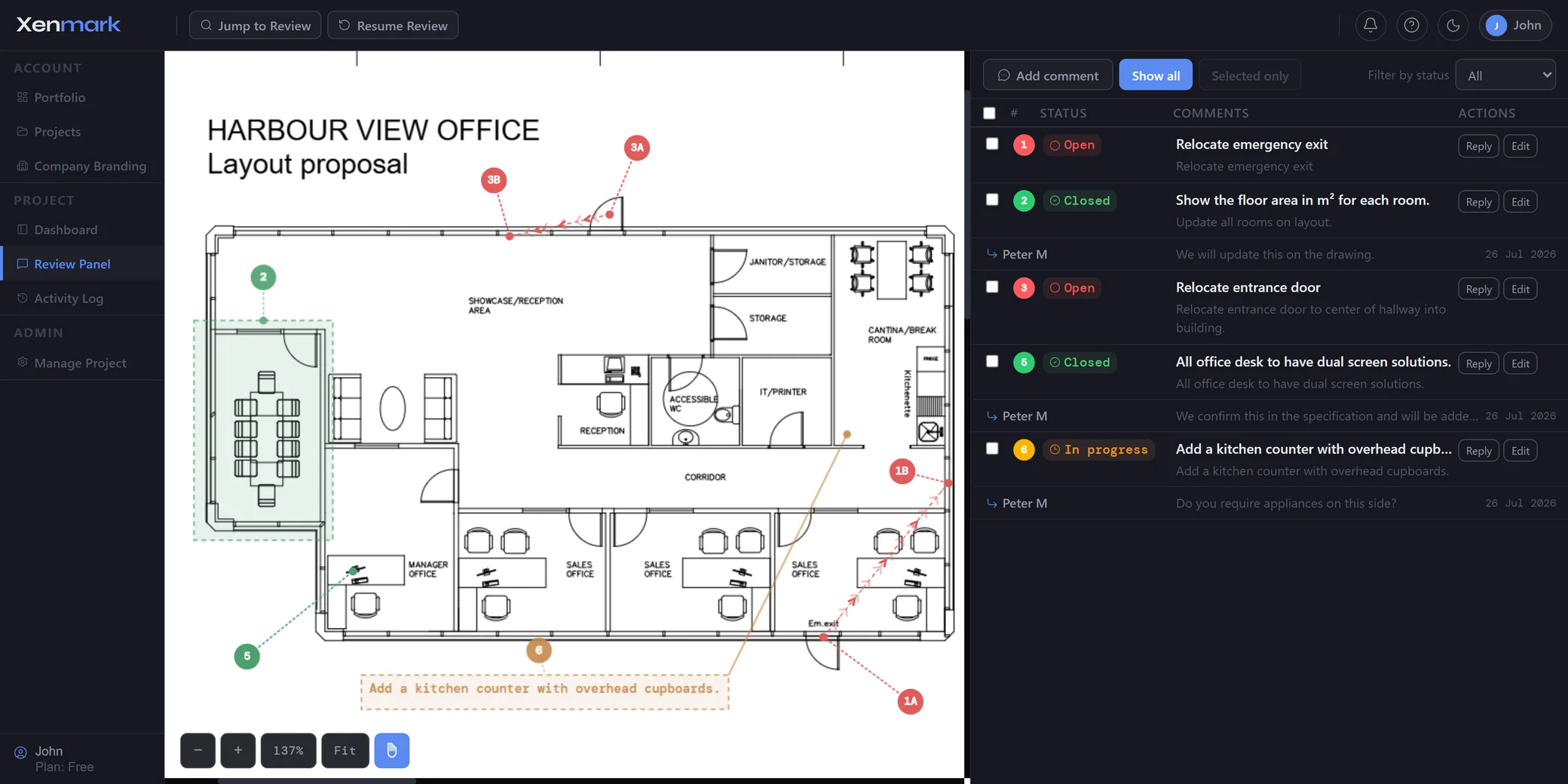
What can asset owners and operators review in Xenmark?
Asset owners can use Xenmark for issued technical drawings that need owner-side review, comment or follow-up. That can include design-stage drawings, contractor submissions, modification drawings, equipment layouts, operating-asset updates and revised PDFs returned after comments.
The common factor is not the industry. It is the owner-side job: someone else authors the technical drawing, while the owner needs to check whether it reflects operational requirements, interfaces, access needs, maintainability concerns or previously agreed changes.
Each review point can be placed directly on the drawing instead of being described only in a separate email or spreadsheet. The owner can then invite the responsible consultant, contractor or supplier into the review and keep the discussion tied to the point being discussed.
How do asset owners keep several external reviewers aligned?
Use the issued PDF as the shared reference and give each issue a numbered location. Different reviewers can comment in the same project rather than returning separate marked-up files that someone must later reconcile.
Editors can create comments. Participants can reply and export without opening new comment threads. That distinction is useful when the owner wants consultants or suppliers to answer specific points without turning the review into an uncontrolled list of new requests.
Statuses and the activity log make it easier to see what has been discussed and what still needs attention, while the original drawing remains the common visual reference.
How should an operator record that a drawing no longer matches the asset?
Start with the latest known issued drawing and mark each observed discrepancy at the location it affects. Use one numbered comment per issue so each point can be discussed and followed separately.
Examples might include relocated equipment, changed room layouts, rerouted services or access changes. The operator’s note is an observation for review, not automatically verified as-built information.
How does this help with accumulated modifications?
Instead of sending one email every time a small difference is noticed, the owner can collect several drawing-specific items in a structured review. Each item remains separate, with its own location, thread and status.
That can make it easier to scope an engineering update package and identify which drawings need attention. It does not eliminate the need for site verification, engineering assessment or the plant’s management-of-change process.
How should long-lived asset drawing updates be handled?
Preserve the link between the observation, the original drawing revision and the returned issue. Avoid overwriting the starting PDF or treating an operational observation as the new controlled record.
The responsible engineering party should assess the change, produce the technical revision and issue it through the owner’s normal process. Xenmark can then hold the next review round.
That sequence works for both capital projects and operating assets while keeping the distinction between review history and official asset information clear.
How does revision review work from the owner’s side?
When the design team issues a revised PDF, upload it as the next revision of the same drawing. Earlier comments remain tied to the revision where they were made, so the owner can refer back to the previous review while checking the returned drawing.
Xenmark does not automatically decide that an earlier request has been implemented. The owner or appointed reviewer checks the new PDF and records the outcome. Any genuinely new finding should be raised on the new revision.
That creates a cleaner lifecycle than overwriting the old marked-up drawing or trying to reconstruct which comments belonged to which issue.
How can owners keep a usable review record?
Export the marked-up comment-plan PDF and the matching Excel comment register. The same numbered points appear in both, giving the owner a visual record and a tabular list that can be filed, shared or used in project meetings.
This is particularly useful when an organisation still expects an Excel comment register but wants the review itself to remain anchored to the drawing. The export is a review record; it does not turn the marked-up PDF into a controlled design issue or an approval document.
How do operators avoid creating another uncontrolled drawing archive?
Treat Xenmark as the review workspace, not the final record repository. Start from the latest controlled PDF available to the team, run the review, then make sure the formally revised drawing is returned to the organisation’s document or asset-information system after the proper checks.
That keeps the convenience of browser-based review without creating uncertainty over which drawing is the official record.
Does Xenmark replace the owner’s CDE, asset system or document control?
No. Xenmark is not a common data environment or formal document-control system. The owner’s controlled document repository should continue to manage approved or formally issued project and asset records.
Xenmark’s role is narrower: structured review on issued PDFs, discussion around numbered points, revision-to-revision review and an exportable record of the review activity. That makes it useful alongside the systems that control the official document set rather than as a replacement for them.
Xenmark is for reviewing and coordinating issued PDF drawings. It does not replace the CAD, BIM, engineering or design-authoring software used to create the design, and it does not perform formal technical, contractual, statutory or regulatory approval.