Project managers, construction managers and owner's representatives often own the coordination of a drawing review rather than the technical authorship of the answer. Xenmark gives that coordinating role one place to collect comments, keep responses attached to locations and check the next revision.
This page is for owner's representatives, project managers, construction managers and site teams.
How can a project manager combine comments from several organisations?
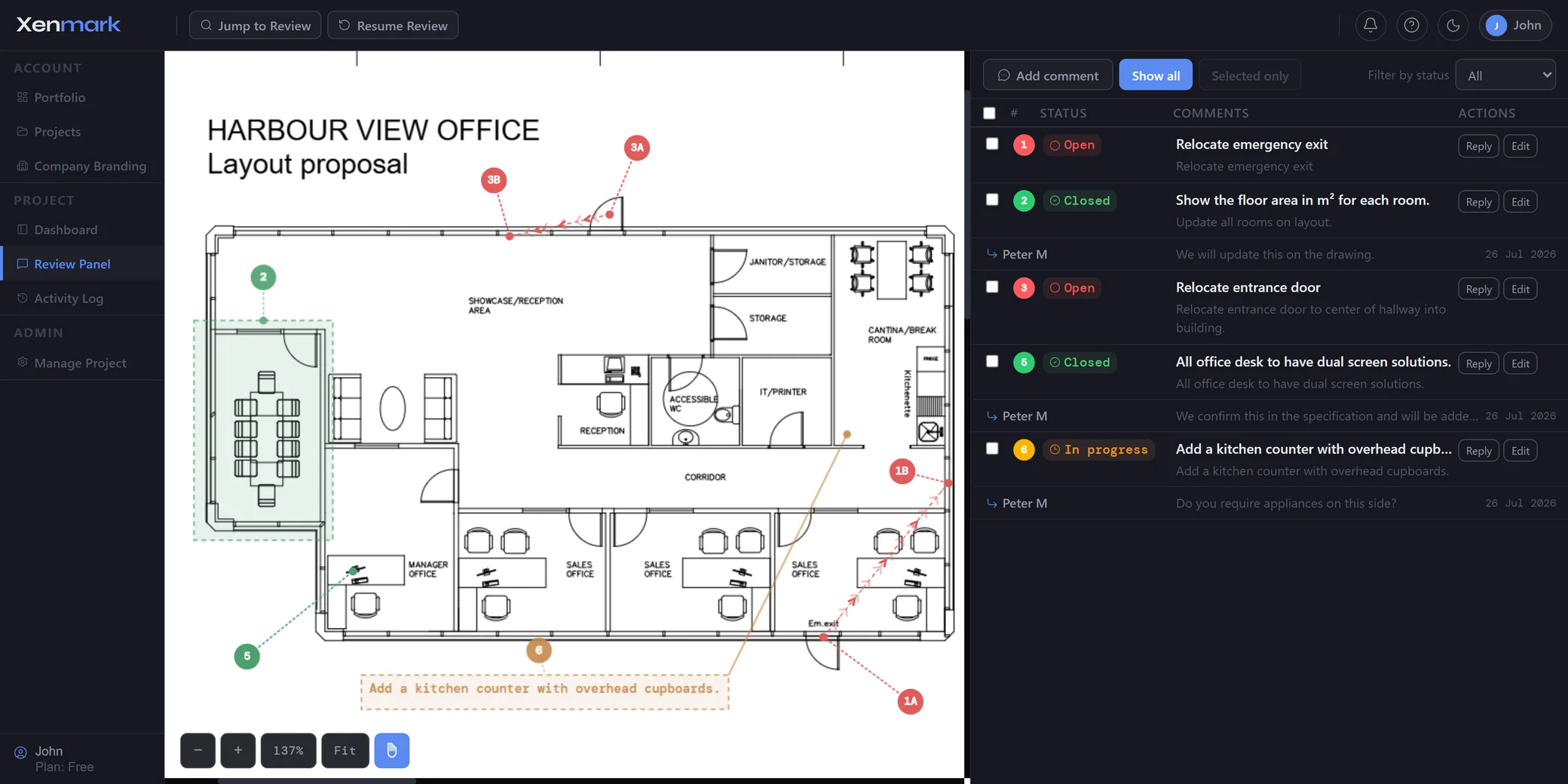
Give everyone the same issued PDF and let reviewers place numbered comments at the exact locations they are discussing. Instead of receiving separate PDFs from the architect, engineer, contractor and owner team, the project manager can see the comments together and keep each discussion attached to the point it concerns.
That reduces the administrative work of manually merging markups and makes duplicate or conflicting comments easier to identify during the review itself.
How should a site or construction team record a drawing issue?
Start with the issued drawing that the site team is using and place a numbered comment on the exact location involved. The comment should state what has been observed or what needs clarification without pretending the site team has already made the design decision.
Useful context can include level, grid, room, equipment tag, nearby element, measured site value or an image attachment. The better the location and factual context, the easier it is for the designer or contractor to understand what needs review.
How should roles be used in a multi-party review?
Use Editor access for people who should be able to create new review comments. Use Participant access for people who should primarily read, reply and export.
That gives the project manager a simple way to shape the review. For example, an owner-side reviewer and lead consultant might be Editors, while a specialist who has been invited to answer a defined set of questions could be a Participant.
Invited reviewers join free and do not need their own paid plan.
How can designers answer site questions without losing context?
They can reply in the comment thread attached to the numbered point. That way the response stays with the location that triggered the question.
If the designer needs another measurement, photograph or clarification, the site team can add it in the same discussion. This creates a compact technical history around the point even when the formal decision is recorded elsewhere.
What happens when the consultant or contractor issues Rev B?
Upload the revised PDF as the next revision of the same drawing. The earlier review remains tied to Rev A, so the project manager can refer back to what was requested before checking the new issue.
The reviewer still makes the judgement about whether the new drawing answers the earlier comment. Xenmark does not automatically transfer old pins to the new sheet or close the issue because a new revision exists.
That distinction is useful for project governance: the record shows the request, the response and the subsequent issue without pretending the software made the technical decision.
How do you hand the review record to people outside Xenmark?
Export a marked-up PDF and a matching Excel comment register. The common numbering lets someone read the register and find the same issue on the drawing immediately.
A project manager can use that package in meetings, project files or external correspondence when a traditional deliverable is still expected. The exported record documents the review; it does not replace the project’s contractual document-control, RFI or approval procedures.
When is Xenmark not the right system for the project manager?
Do not position Xenmark as the project’s entire CDE, contract administration system, issue register, scheduling system or formal approval workflow. If the project requires contractual RFIs, submittal routing, transmittals, controlled status codes or regulated approvals, those processes should remain in the systems designated for them.
Xenmark is strongest where the project manager needs a clear, visual review layer around issued PDF drawings and wants the comments and revisions to remain easy to follow.
Which site observations should become drawing-review comments?
A good candidate is an observation that somebody else needs to understand in relation to the drawing. Examples include an installed condition that appears different, an inaccessible arrangement, a missing dimension, an unclear interface or a location where the issued design is hard to interpret.
A general defect, safety observation or progress issue that does not depend on a drawing may belong in a field-management or commissioning system instead. Xenmark should not be stretched into every site workflow simply because it can hold a comment.
What drawing-review problems does an owner’s representative actually own?
An owner’s representative often owns the coordination of the review rather than the technical authorship of the answer. The job is to make sure the right reviewer sees the right drawing, that comments are understandable, that responses come back to the correct point, and that the next issue is checked against the earlier round.
That makes this audience distinct from Asset Owners / Operators. The owner may define the requirements, while the owner’s representative or project manager manages the flow between the owner, architect, engineers, contractor and specialists.
Xenmark is for reviewing and coordinating issued PDF drawings. It does not replace the CAD, BIM, engineering or design-authoring software used to create the design, and it does not perform formal technical, contractual, statutory or regulatory approval.