Manufacturers, OEMs and fabricators regularly issue drawings to customers, consultants, contractors and integrators for review. Xenmark gives those external reviewers a PDF workspace while the manufacturer or fabricator retains control of the product, equipment or shop drawing in its own engineering systems.
This page is for manufacturers, OEMs, fabricators and shop-drawing teams, whose work revolves around external review followed by a controlled revision.
How can a manufacturer or fabricator collect customer comments?
Upload the issued PDF and invite the customer or project reviewers. They can place numbered comments directly on the equipment, dimension, connection, access zone or note they want to discuss.
That reduces the need for the manufacturer to interpret a separate list that describes locations only in words. Each response can remain in the thread attached to the point.
How does this help with interface drawings?
Interface reviews often involve several organisations: the OEM, customer, consultant, contractor and sometimes another supplier. Xenmark can give those parties one issued PDF to review together.
Comments can focus on connection points, footprint, access, maintenance space, interfaces, mounting or other project-specific concerns. The manufacturer and responsible project engineer still decide how any requested change is incorporated into the controlled design.
Can external reviewers stay outside internal engineering tools?
Yes. Reviewers work from the issued PDF rather than the manufacturer’s CAD, PLM or PDM environment. That can simplify external participation while keeping the authoring and controlled engineering data inside the manufacturer’s normal systems.
Xenmark is not a replacement for PLM, PDM, ERP or product configuration control.
How can reviewers comment on a shop drawing clearly?
Give the contractor, consultant or client the issued shop-drawing PDF and let them place numbered comments directly on the detail, dimension, connection or note they want reviewed.
The fabricator receives the text together with the drawing location, which is more useful than a separate spreadsheet entry that requires the reviewer to describe the location from scratch.
How can fabricators answer several reviewers without creating parallel markup files?
Use the comment thread under each numbered point. The fabricator can answer the consultant, contractor or owner in context while all parties refer to the same review copy.
If several reviewers are involved, the Project Manager can decide who is allowed to create comments and who should mainly reply. This keeps the review structured without requiring every participant to use the fabricator’s internal detailing tools.
What happens when the manufacturer issues a revised drawing?
Upload the revised PDF as the next revision of the same drawing. Earlier comments remain on the earlier issue, giving the customer and OEM a clear history of what was discussed.
Xenmark does not automatically determine that a revised product drawing satisfies the customer’s requirement. The relevant technical reviewers still make that judgement.
How can shop-drawing teams reduce manual comment reconciliation?
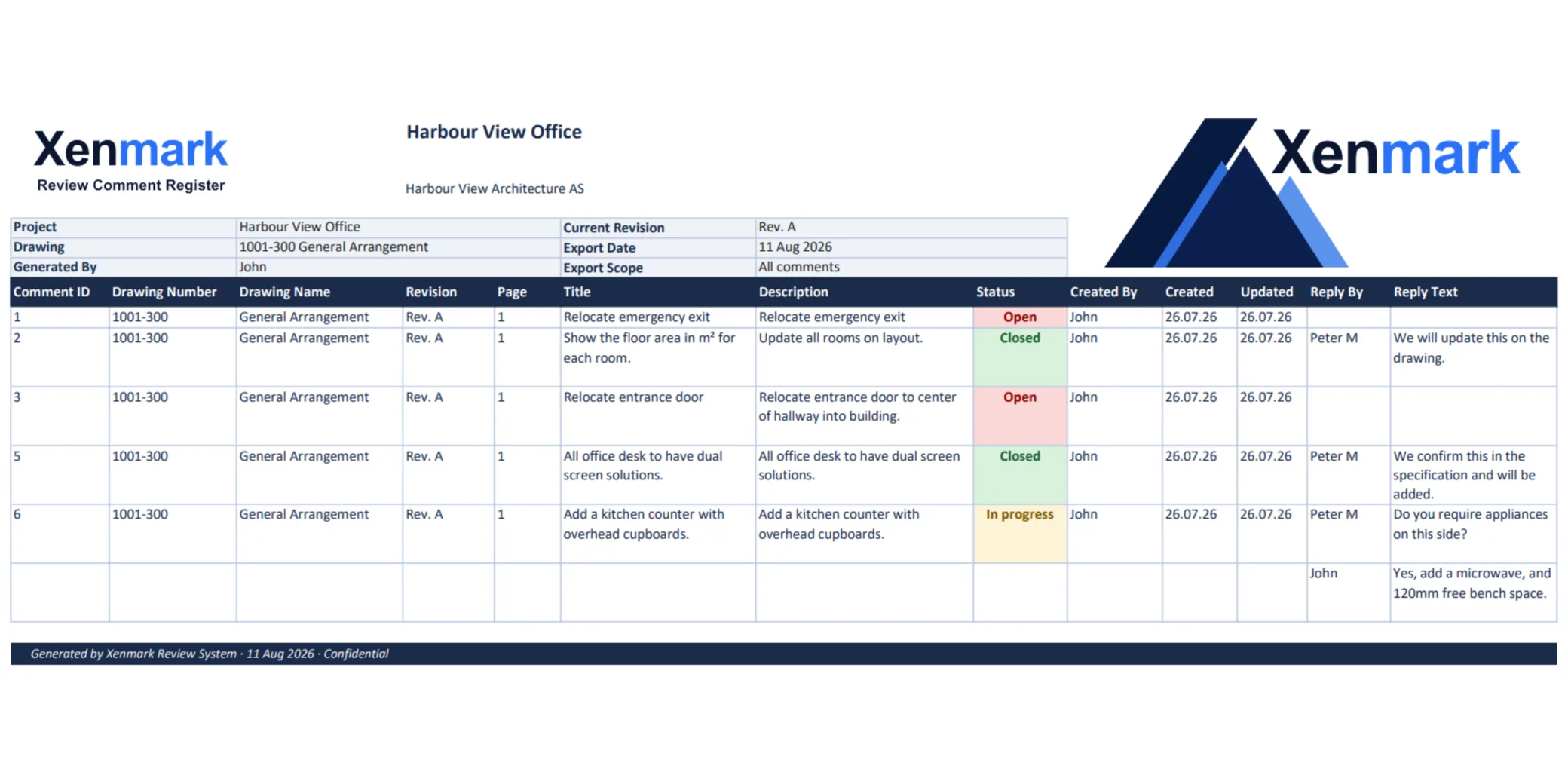
Use one numbered review list generated from the drawing itself rather than maintaining independent numbers in a spreadsheet and on several PDFs. Reviewers can comment visually, while the exported Excel register gives the fabricator the tabular format many projects still expect.
That removes one source of administrative mismatch: comment 12 on the PDF and comment 12 in Excel are the same point because both came from the same review.
The fabricator still controls its own drawing register, revision coding and release workflow. Xenmark simply keeps the review comments and responses aligned with the visual document they refer to.
How can a manufacturer export the review?
The review can be exported as a marked-up PDF and matching Excel comment register. The common numbering is useful when a customer expects a conventional comment sheet but the manufacturer wants the visual context to remain attached to each point.
The export documents the review discussion; it does not replace the manufacturer’s release, configuration-control or approval process.
Does Xenmark replace formal shop-drawing submittal workflow?
No. If the project requires formal submittal routing, approval codes, contractual response times or controlled transmittals, those processes continue in the project’s designated system.
Xenmark is the collaborative PDF review layer. A project may use it before or alongside the formal submittal process, but it should not be described as the contractual approval system unless the project has explicitly made it one.
How should manufacturers handle comments that request a product change?
Treat the comment as a request for technical review. The OEM should evaluate whether the change is possible, compatible with the product configuration, commercially agreed and safe before altering the controlled design.
The discussion can capture the request and clarification, but Xenmark does not manage engineering change orders, configuration baselines or manufacturing release.
A PDF markup does not replace product lifecycle management.
How should fabricators treat comments marked resolved?
A resolved review comment means the team has completed that discussion according to the review workflow. It does not automatically mean the drawing is released for fabrication, approved by the engineer, accepted under the contract or ready for manufacture.
Those decisions belong to the authorised project or fabrication process.
Being explicit about this lets Xenmark offer useful status tracking without confusing a collaborative review state with a formal drawing status.
Xenmark is for reviewing and coordinating issued PDF drawings. It does not replace the CAD, BIM, engineering or design-authoring software used to create the design, and it does not perform formal technical, contractual, statutory or regulatory approval.