Commissioning and handover often expose the final gap between the issued drawing and the asset that has actually been installed. Xenmark can help the team place those findings on the relevant PDF, route clarification to the responsible party and review the returned drawing revision before the asset information is handed over.
What drawing-related findings fit a commissioning review?
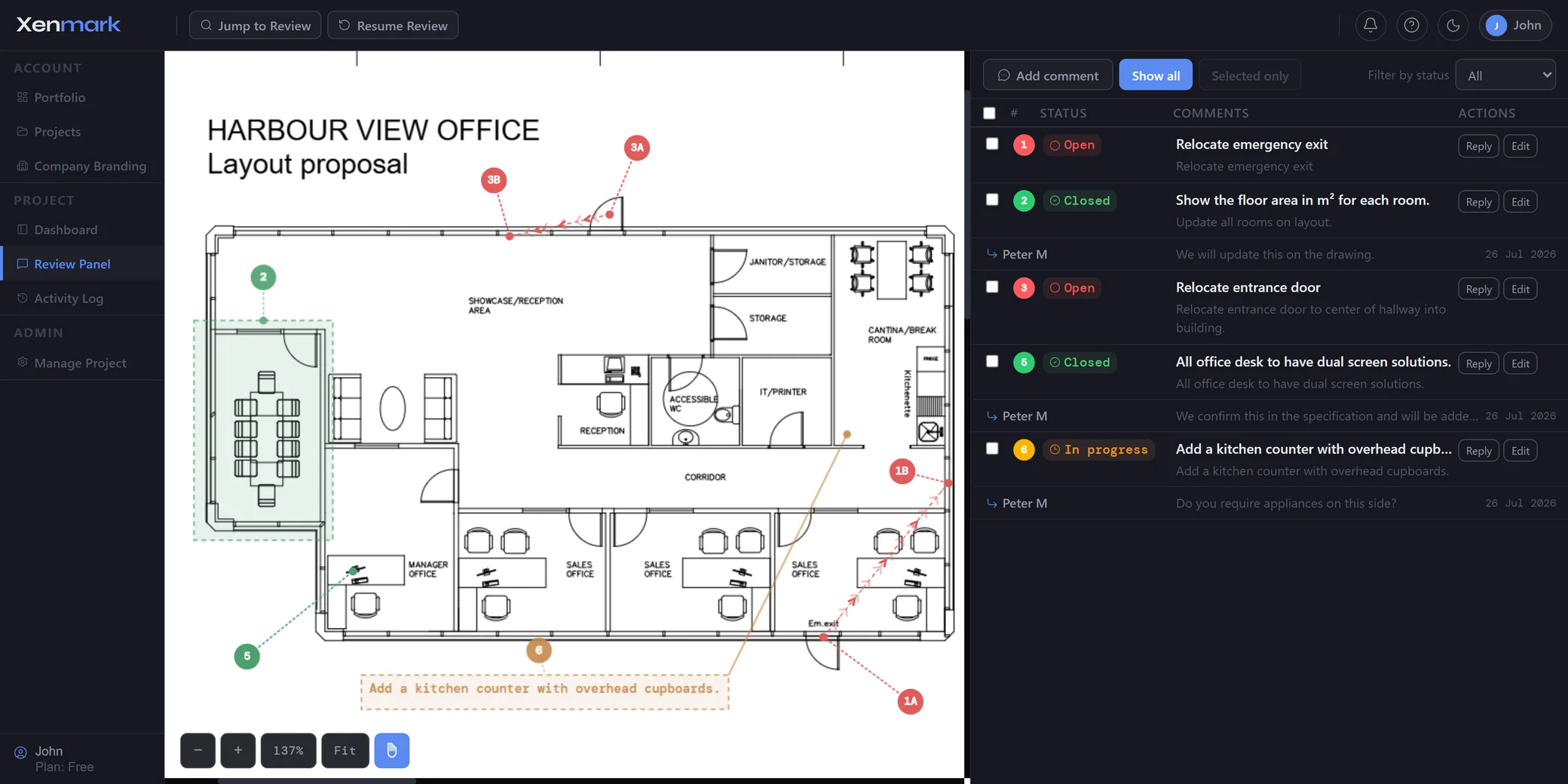
Use Xenmark for findings that are easiest to understand when anchored to the drawing: equipment locations, access arrangements, labels, room layouts, service routes or other installed conditions that appear inconsistent with the issued PDF.
Each point should describe the observed condition and what needs checking. The commissioning team is recording review input; it is not automatically creating verified record-drawing information.
How can commissioning staff give the design team enough context?
Place the numbered comment directly on the drawing and add the practical information available from site: location, equipment tag, observed condition, measured value where useful, and an image attachment when it helps.
This can reduce back-and-forth, but it does not remove the need for survey, verification or engineering assessment when the responsible party requires it.
How should the responsible designer or contractor respond?
Keep clarification in the comment thread attached to the original finding. The responsible party can ask for more information, explain the intended condition or confirm that a drawing revision will be prepared.
If the point must also enter a formal commissioning, defect, punch-list or contractual workflow, that process remains in the designated system. Xenmark keeps the drawing-specific context available alongside it.
What happens when the final revised drawing is issued?
Upload the revised PDF as the next revision and check it against the earlier finding. The old comment remains on the old issue so the handover team can see what prompted the change.
Xenmark does not certify that the drawing is a correct as-built or record drawing. The responsible project and asset-information processes still determine the status of the final document.
How can the review record support handover?
Export the marked-up PDF and matching Excel comment register. The package can help the handover team show which drawing-related points were raised and how the review progressed.
The final controlled as-built or record-document set should still be stored and handed over through the organisation’s required document or asset-information system.
How does this connect to the future facility operator?
A clean drawing-review history can make the transition easier because the operations team can see which points were identified during commissioning and which revised PDFs were reviewed before handover.
After operations begin, the same review pattern can be used when later physical changes cause the record drawings to fall behind. See Asset Owners / Operators.
Which handover drawing problems are a strong fit for Xenmark?
The best fit is a discrepancy or clarification that can be understood faster when somebody sees the exact location on the drawing. Commissioning teams may find that an equipment location, service route, access arrangement or room layout differs from the current issued PDF.
The team can document the point, route it to the responsible organisation and review the returned drawing. A generic defect or commissioning test result that is unrelated to a drawing should remain in the commissioning or punch-list system instead.
Xenmark stays focused on drawing information; it is not a complete handover platform.
How can handover teams prevent final comments from disappearing after project closeout?
Keep the review tied to the drawing revision and export the final comment record before the project workspace is archived. Make sure the formally revised record drawing is then stored in the owner’s controlled document or asset-information system.
The Xenmark history explains what was raised during review; the official repository identifies which document became the accepted record.
Connecting those two responsibilities helps the future operator understand the handover without turning the review tool into the long-term source of truth for every asset document.
Who should own the final decision that a handover drawing is complete?
The authorised project or asset-information party should decide when a drawing becomes the accepted record. A commissioning engineer, contractor, consultant, document controller or owner may all contribute, but Xenmark itself should not assign that formal status.
The review can show that a commissioning finding was raised, discussed and checked against a revised PDF. The project’s controlled handover process then determines whether that revision is accepted and where it is stored.
Keeping those responsibilities separate stops a collaborative comment status being mistaken for a contractual or asset-information approval.
Xenmark is for reviewing and coordinating issued PDF drawings. It does not replace the CAD, BIM, engineering or design-authoring software used to create the design, and it does not perform formal technical, contractual, statutory or regulatory approval.