The first review round asks, “What needs attention?” The next round asks two different questions: were the earlier points addressed, and did the new revision introduce anything else? Treating Rev B as a clean sheet loses the history. Treating old markups as if they automatically sit on the right Rev B geometry can be just as misleading.
Use the drawing identity and a short disposition worksheet to connect those rounds. The worksheet records the reviewer's judgement; it is not a substitute for the responsible designer's technical checks or any formal approval.
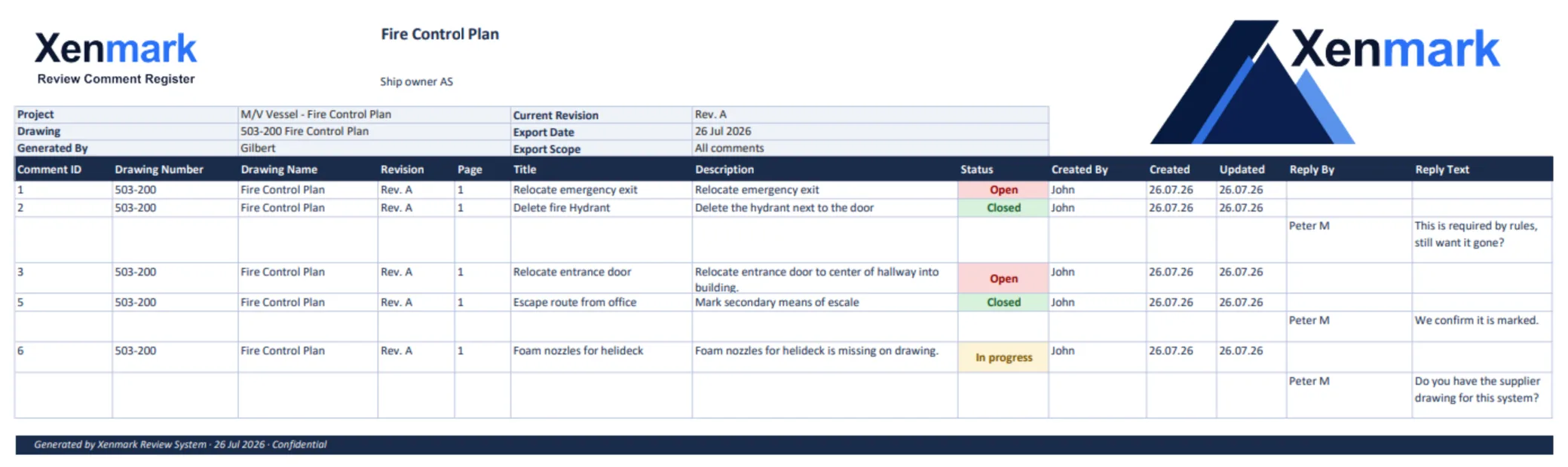
1. Confirm which drawing and revision you received
Read the drawing number, title, revision and issue information on the PDF. Compare it with the package transmittal or project document register if one exists. A filename may be convenient, but it should not be the only proof that the file is the current issue.
If the returned file has a different drawing number, split sheets or changed title, establish the mapping before evaluating old points. Otherwise a reviewer can accidentally mark a comment closed on the wrong drawing. Record any uncertainty and ask the issuing party before proceeding.
2. Read the old review record before looking for fixes
Open the previous issue and its comments. List each point by its stable identifier, original drawing revision, location, question and responsible responder. Keep the wording of the original question visible. A comment such as “confirm valve access” cannot be judged by looking only for a moved valve symbol; the access concern may remain.
For a small package, a one-page disposition table is enough:
| Earlier point | What to inspect on the new issue | Reviewer conclusion | Next action |
|---|---|---|---|
| A-01 — pump location differs from onboard observation | Pump location and adjacent connections | Addressed in the drawing; verify associated interface | Ask engineer to confirm connection detail if unclear |
| A-02 — valve tag does not match field photograph | Valve tag and schedule reference | Still unclear | Request tag confirmation |
| A-03 — access to equipment questioned | Clearance and access route | Partly addressed | Ask yard and engineer to review remaining constraint |
This table is illustrative. Its conclusion words are human review outcomes, not Xenmark status labels.
3. Decide what happened to each earlier point
Use specific conclusions: addressed, partly addressed, unresolved, clarification needed, or no longer relevant. Attach a brief reason and the new revision reference. “Addressed” should mean the reviewer checked the relevant drawing area and understands why the concern is resolved under the review scope. If the answer depends on a site measurement, supplier data or another drawing, say so.
Do not change the old comment’s history to make Rev A appear cleaner. Earlier Xenmark comments remain attached to Rev A. The team may close a review item according to its process, but the historical point and the new-revision judgement serve different purposes.
4. Review the new revision as a drawing in its own right
After checking old points, scan the new PDF for changes that were not in the original comment list. New equipment, rerouted lines, altered access or moved symbols can create fresh questions. Some teams use revision clouds or a change list to guide attention; these aids do not replace looking at the affected context.
Raise genuinely new findings on the new revision. Give them their own identifiers and locations. Avoid attaching a new question to an old point only because the two are nearby.
5. Record and hand over the result
Record which revision was reviewed, by whom and when, what happened to each earlier point, and what new issues were raised. Retain the prior and new PDFs in the project’s controlled document process. If using Xenmark, a matching annotated PDF and Excel review record may help with the handoff. Neither file is a formal design or class approval by itself.
Common mistakes are easy to recognize: relying on the filename alone; assuming a new PDF means every old issue was fixed; copying old comment positions onto a revised drawing; looking only at revision clouds; and marking a point Closed without noting why. A short disposition worksheet prevents much of this confusion because it makes the human judgement explicit.
What if the geometry moved so much that the old location no longer exists?
Do not force the old comment onto the nearest-looking object. Start from the original question and the drawing’s revision context. Ask whether the item was removed, renamed, moved to another sheet or replaced by a different arrangement. If the design party supplied a change list or response, use it as evidence, then inspect the issued PDF. Record the conclusion in words even if there is no exact new pin location. If the team cannot identify the corresponding feature, keep the point open for clarification.
Similarly, when one old issue becomes several new questions, keep a clear parent reference. For example, an original pump-location concern may be addressed visually, while the new connection and service access still need review. The return record can say “A-01 location addressed; see new Rev B points B-04 and B-05 for connections and access.” That is more honest than marking A-01 completely resolved and burying the remaining work.
Who should decide whether a point is addressed?
The reviewer who raised a concern may be best placed to say whether the returned drawing answers it. A technical specialist may need to check calculations or design intent. An owner representative may need to confirm that the operational need was understood. Assign the check deliberately. “No one objected” is not an adequate disposition when the original question required evidence.
If an answer arrives outside the PDF-review tool, such as a transmittal or supplier document, reference it in the outcome. Keep private or controlled files in the project’s authorized document system. A useful record connects the response, the new drawing issue and the person’s conclusion without confusing a review decision with formal design approval.
Quick second-round checklist
Before closing the round, confirm: correct drawing and revision; every earlier point reviewed; new changes scanned; each conclusion recorded with a reason; new points raised against the new issue; unresolved items assigned; and the review export saved with the project’s controlled files. If any of these are missing, the review may still be in progress even though the PDF has a new revision letter.
If a project has its own official response matrix, the worksheet can map its point IDs into that matrix rather than creating a rival master. The purpose is to make each old question auditable against the new issued drawing. It is not to impose an extra status system or require that every project adopt the same columns.
The method also works when no specialized review software is available. A team can keep the old PDF, new PDF and numbered worksheet together, provided it records the drawing identities and the human disposition clearly. The important discipline is to make the result checkable by the next person.
For the full vessel-to-engineer update path, see Vessel Drawing Updates. For multi-party markup of an issued PDF, see Ship Drawing Review & Markup.
Related pages
Return to Maritime & Shipbuilding for the full Industry hub. The global Revision Review Use Case explains the sector-neutral method. Ship Owners, Shipyards, Superintendents / Technical Managers and Marine Engineering Companies describe the people who may participate in the next round.