Finding a drawing issue is only the beginning. The harder part is keeping the location, comment, responses, status and revision context together while several people work through it.
Xenmark treats each numbered drawing comment as a review item that can be discussed and progressed, rather than as a static note on a PDF.
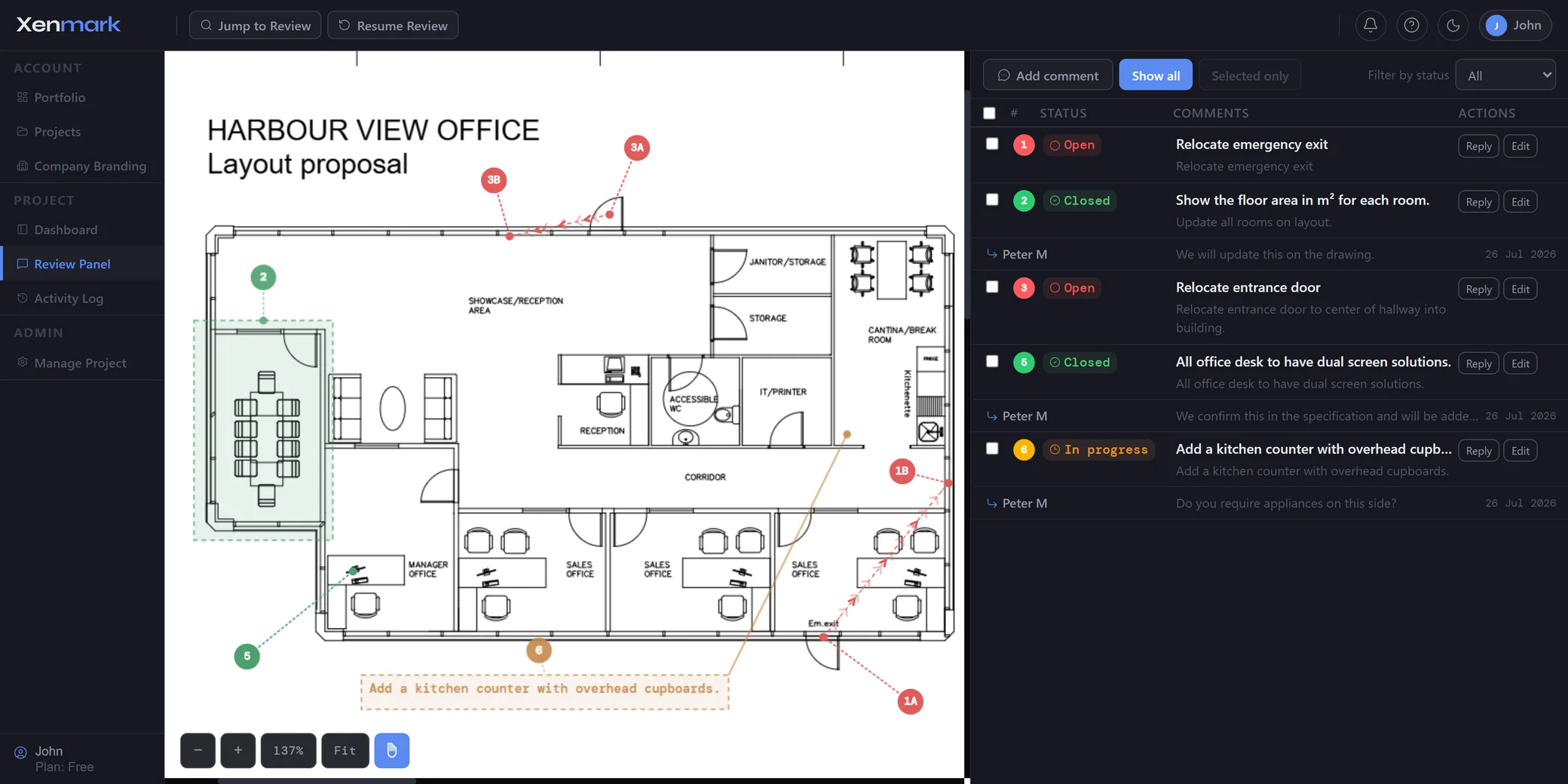
What should a tracked drawing comment contain?
A useful drawing review item normally needs more than a sentence. It needs:
- the location on the drawing;
- a stable comment number;
- the reviewer’s written point;
- replies and clarification;
- supporting context such as an image where relevant;
- its current status;
- the drawing revision it belongs to.
When those pieces are split between a PDF, spreadsheet and email chain, somebody has to repeatedly join them back together.
Xenmark keeps them around the same review item.
How do comment statuses work in Xenmark?
Comments use three review statuses: Open, In progress and Closed.
Open identifies a point that still requires review attention. In progress shows that the item is being worked through. Closed indicates that the collaborative review item has reached the state the team has assigned to it.
Those statuses are review workflow states. They should not be presented as engineering certification, contractual acceptance or formal document approval.
The simple status model is intended to answer a practical question quickly: which drawing comments still need attention?
Why keep replies under the original comment?
Because the answer is part of the review history. A comment may lead to a clarification question, another response, an image attachment, and eventually a decision about what the next drawing should show.
If those exchanges live in separate email threads, the comment register cannot explain the whole story without manual copying.
A threaded response keeps the discussion and its drawing location together.
How do @mentions and image attachments fit into comment tracking?
Use @mentions when another reviewer needs to see or answer a specific point. Use an image attachment when visual context from outside the drawing helps explain the issue.
Those tools belong to the same comment lifecycle rather than creating separate side channels.
The attachment or mention does not change the technical authority of the comment. It simply makes the review information easier to understand and route.
What happens to tracked comments when the drawing is revised?
They remain tied to the revision where they were raised. This preserves the original context.
When the next PDF arrives, the reviewer can look back at the earlier discussion while checking the new revision. Xenmark does not automatically move the comment onto the new sheet and does not automatically decide it was resolved by the revision.
If a new issue exists on the new PDF, raise a new review item there.
See Revision Review.
How is comment tracking different from a drawing comment register?
Comment Tracking is the active workflow. It is where the team raises the point, replies, changes status and follows the issue through the review.
The Drawing Comment Register is the portable output. It turns the structured review into a spreadsheet and matching marked-up PDF that can be used outside Xenmark.
The two overlap but do different jobs.
See Drawing Comment Register & Review Deliverables.
How does comment tracking support a review before approval?
Before a drawing is accepted or passed to another formal process, the team can check which review items remain Open or In progress and whether the relevant revised drawing has been reviewed.
That gives the people making the decision a clearer collaborative review record.
It does not make Xenmark the approval authority. The formal acceptance step still follows the contractual, organisational or regulatory process that applies.
See Drawing Approval.
Can comment tracking work with both internal and external teams?
Yes. The same review item can involve an internal reviewer, an external designer, a supplier or a client, depending on the project.
Project roles define what each participant can do, while project-based access keeps the review isolated from unrelated work.
This is particularly useful when responsibility for an answer sits in another organisation but the person running the review still needs visibility over the current state.
What record remains after the comment is closed?
The comment remains part of the review history for the revision where it was created, and the review can later be exported into PDF/Excel deliverables and the project archive.
A Closed status should therefore mean the item has completed the collaborative workflow—not that the underlying design has been independently verified by Xenmark.
What makes a review status useful rather than just another label?
A status is useful when the team applies it consistently to a clearly defined review item. The location, written comment and reply history explain what the issue is; the status explains where the team currently is with it.
That is why Xenmark keeps status at comment level rather than treating the entire drawing as simply “reviewed” or “not reviewed.” One drawing may contain a mix of finished and unfinished issues at the same time.
Xenmark’s status model is deliberately Open, In progress and Closed. If a project needs contractual status codes, discipline-specific approval codes or formal issue states, those belong in the project’s designated system.
How should teams avoid closing comments too early?
A Closed status should reflect the team’s review decision, not the mere existence of a reply or a new drawing revision.
If the comment requested a design change, the reviewer may need to inspect the revised drawing before treating the review point as complete. If the answer was clarification only, the reviewer may close it once the explanation is understood.
The important rule is that Xenmark provides the structure; the people responsible for the review make the judgement.