External drawing reviews become fragmented when every organisation returns feedback in its own format. Xenmark gives the people involved one browser-based review around the same issued PDF, while the design files and formal document systems remain with the organisations that own them.
Invited reviewers can participate without buying their own plan.
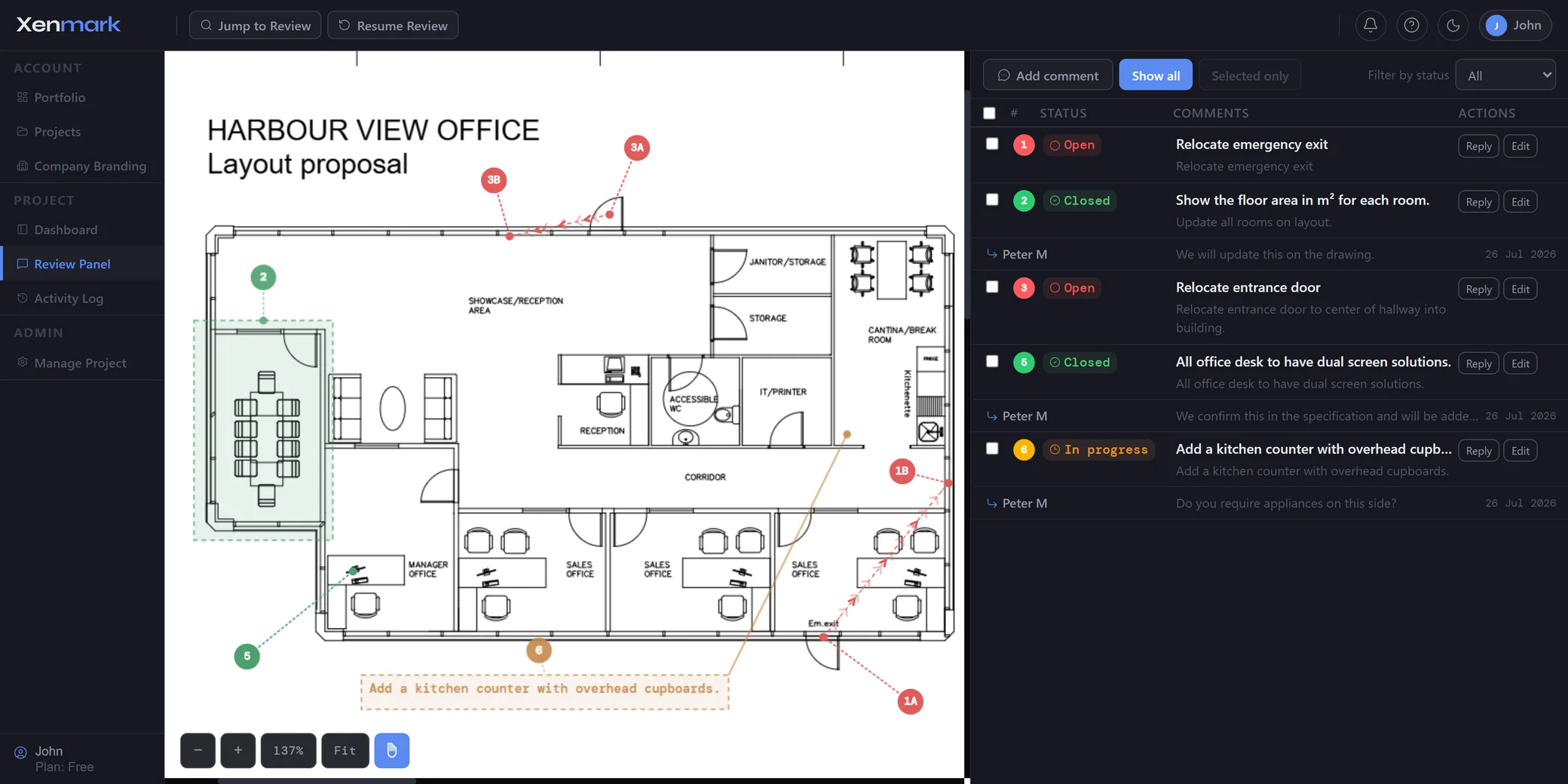
Who can take part in an external drawing review?
A Xenmark review can include clients, consultants, contractors, suppliers, engineering companies, owners and other people outside the organisation running the project.
The Project Manager runs the project and manages access. Editors can actively add review content. Participants can view the project, reply to comments and export the review outputs.
That makes it possible to include a person who needs to answer drawing questions without giving that person access to unrelated projects or the underlying CAD/BIM authoring environment.
Do external reviewers need to buy a Xenmark licence?
No. Someone invited into another person’s Xenmark project does not need to buy their own plan merely to participate in that review.
That matters because external reviews often fail for administrative reasons rather than technical ones. If a consultant, supplier or client has to purchase and deploy another desktop tool before commenting on one drawing package, the team often falls back to email attachments.
A browser link and project invitation reduce that barrier.
How do you stop external reviewers from creating separate PDF copies?
Use the uploaded drawing as the shared review reference. Reviewers place comments and markups in the same project rather than each producing their own independently marked-up PDF.
That means the current review state is not determined by whichever attachment somebody last opened in their inbox.
The drawing, comment location, replies and status remain together.
How should roles be used across company boundaries?
Choose the role according to what the invited organisation actually needs to do.
Use Editor when the person needs to add comments, annotations or other hands-on review content.
Use Participant when the person mainly needs to read the drawing, answer existing comments and export the review.
The Project Manager remains responsible for running the project and access.
Project-based access keeps one client’s review separate from another project’s content.
How do replies and attachments help external reviews?
External review points often need clarification before anybody can act on them. The reviewer may raise a point, the design team may ask what was meant, and the reviewer may respond with an image or additional detail.
Keeping that exchange under the numbered comment removes the need to reconstruct the conversation from email later.
@mentions can draw a person’s attention to the relevant point without moving the technical discussion away from the drawing.
What happens when the external review produces a new revision?
Upload the returned PDF as the next revision in the same drawing slot. Earlier comments remain tied to the earlier revision so everyone can refer back to what was originally raised.
Xenmark does not automatically move the old comments to the new PDF and does not determine whether the designer fixed them.
The relevant reviewer checks the new revision and records any further review point on that revision.
See Revision Review.
How can an external review lead toward acceptance without turning Xenmark into the approval system?
Use Xenmark to organise the collaborative review before the formal acceptance decision. Reviewers can raise comments, respond, track status and check revised drawings.
If the contract, customer process, authority or organisation requires a separate formal approval, signature, transmittal or document status, that step remains in the required system.
See Drawing Approval for the boundary.
What can you send back after the external review?
Export a Comment Plan PDF and matching Excel comment register. The same comment numbers connect the visual location and the written list.
That is useful when another organisation expects a conventional comment sheet even though the active review happened collaboratively online.
When the project is complete, the fuller archive bundle can also be stored on your own side.
Which external workflows fit especially well?
Common patterns include:
- client review of engineering drawings;
- consultant review of contractor drawings;
- supplier or vendor drawing feedback;
- owner–designer review;
- manufacturer–customer review;
- multidisciplinary reviews across separate companies;
- joint venture or consortium teams that do not share one internal software environment.
The Industry and Team pages cover the sector-specific versions of those scenarios.
What is a practical way to set up an external review?
Start by deciding who is running the review and what each external party actually needs to do.
A simple setup is:
- the Project Manager uploads the issued drawing;
- hands-on external reviewers receive Editor access where they need to create comments;
- people who mainly need to answer existing points receive Participant access;
- comments are raised on the shared drawing rather than returned as separate marked-up copies;
- replies and attachments stay under the relevant numbered point;
- the next revision is uploaded into the same drawing slot;
- the review is exported when the external handoff needs a conventional PDF/Excel package.
This keeps access understandable and reduces the chance that every invited person becomes another project administrator.
How is cross-company review different from ordinary file sharing?
File sharing solves access to the PDF. It does not automatically solve the review around it.
The difficult part begins after people open the file: where comments are written, how replies are connected, which issue is still active, which revision a comment belongs to and what gets returned to the organisation that issued the drawing.
External drawing review is about that part: maintaining one coherent review across organisational boundaries, not just sending a PDF online.