PDF markup is most useful when the mark does more than decorate the page. Xenmark lets reviewers place visual feedback on a technical drawing and connect that markup to comments, replies, status and review history.
The aim is not to recreate CAD in the browser. It is to make issued PDFs easier to review.
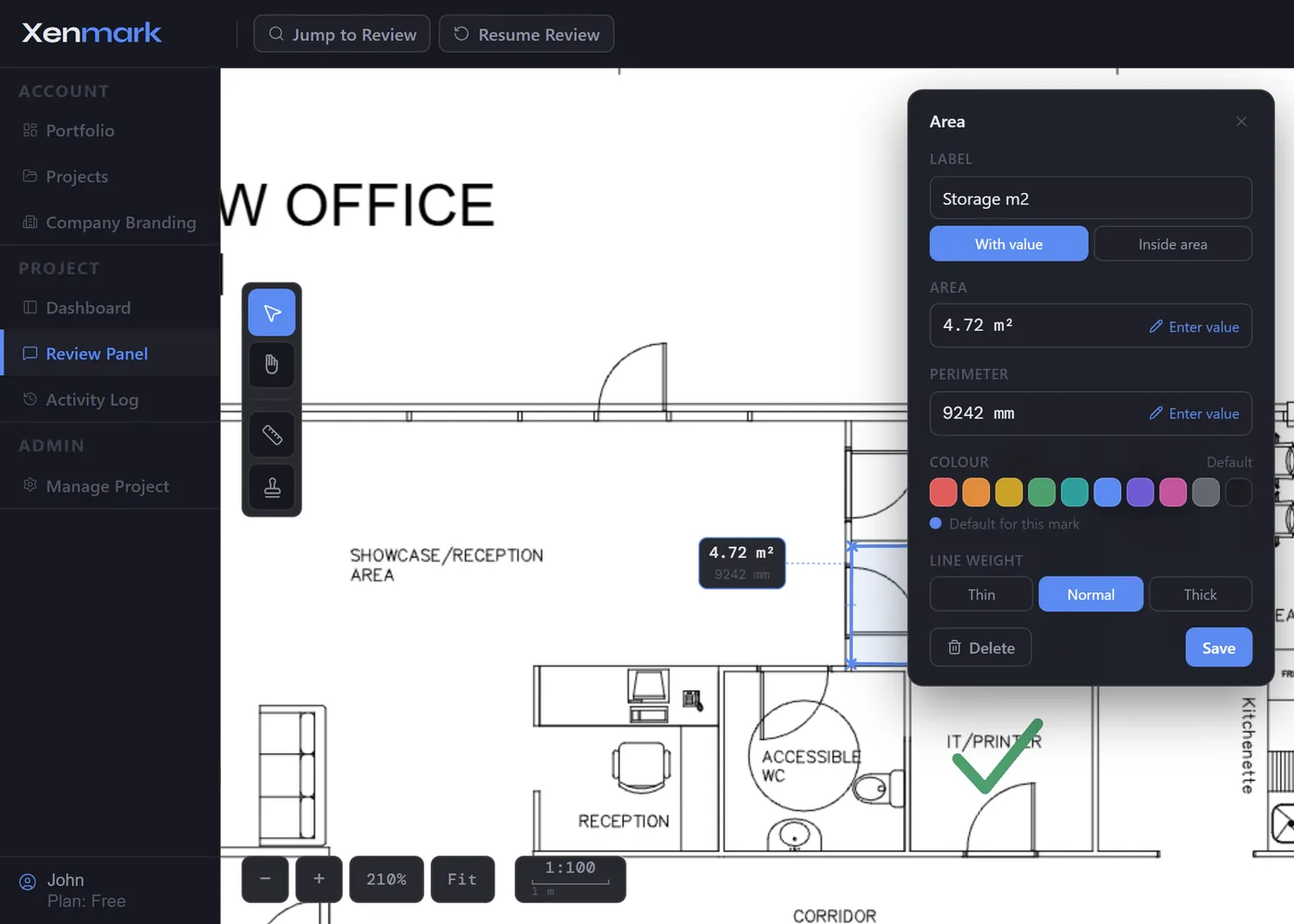
What markup tools can you use on a technical PDF in Xenmark?
Xenmark supports pin, rectangle and callout annotations for review comments, alongside drawing measurements and five quick review symbols: Check, Cross, Attention, Arrow and Cloud.
Use the simplest markup that communicates the point clearly. A pin is useful when the issue applies to one location. A rectangle can identify an area. A callout can draw attention to a region while connecting it to written feedback.
The visual markup gives the comment spatial context. The written review item explains what the reviewer actually means.
Why connect a markup to a numbered comment?
A shape on its own can become ambiguous once the PDF leaves the reviewer. A numbered review comment creates a stable reference that can be discussed, tracked and exported.
That means another reviewer can say “comment 12” and everyone is referring to the same point on the drawing and in the review record.
Stable numbering also matters when comments are removed; the review should not silently renumber the remaining history and change every later reference.
The markup becomes part of a structured review instead of a temporary drawing layer.
Can you add written context, replies and images to a markup?
Yes. Review comments can carry written detail, threaded replies, image attachments and @mentions.
That is useful when the first markup identifies the location but the explanation develops later. A reviewer may place a comment, another person may ask for clarification, and a third may add an image or supporting note.
Keeping those replies with the markup means the drawing location and conversation remain connected.
For the lifecycle beyond the markup itself, see Drawing Comment Tracking.
Can you measure directly on the PDF?
Yes. Xenmark includes Length, Polylength, Perimeter and Area measurement tools. The page scale can be set using presets, a custom ratio, sheet-format information or calibration from a known distance.
Measurements can display in metres, centimetres or millimetres. Where the reviewer needs to show a known value rather than the calculated drawing value, the displayed measurement can be manually overridden.
Those tools are for review context. They do not replace verified survey data, engineering calculation or controlled design dimensions where those are required.
See Drawing Measurement & Scale Calibration for the complete workflow.
When are review symbols better than a full comment?
A symbol is useful when the meaning is already understood by the review team and the point does not need a long discussion. Check, Cross, Attention, Arrow and Cloud give reviewers a quick visual layer on the drawing.
Use a full numbered comment when the issue needs explanation, replies, status tracking or a durable comment-register entry.
The choice is practical rather than hierarchical: symbols communicate quickly; structured comments carry discussion.
What happens to markup when a new revision arrives?
Earlier markup remains tied to the revision where it was created. It should not be described as automatically moving to the same geometric location on Rev B.
The reviewer uses the old revision and its review history as context while checking the new PDF. If a new issue needs to be raised on the new revision, create a new review item there.
This keeps the history accurate even when the drawing layout changes significantly between revisions.
See Revision Review.
Can the markup leave Xenmark?
Yes. The Comment Plan PDF carries review information back onto a portable PDF. Measurements and symbols are also included in the relevant exports, while the Excel workbook provides structured registers for comments and measurement/symbol data.
That means the online review can produce conventional files for teams that need a standalone record afterwards.
See Drawing Comment Register & Review Deliverables.
Is Xenmark a general-purpose PDF editor?
No. Xenmark is focused on technical drawing review. It is not intended to replace a full PDF editor, CAD system or document-authoring application.
If all someone needs is to draw a line or add generic text to a PDF, many tools can do that. Xenmark’s value is that the markup remains connected to a review workflow: comments, replies, status, revisions and exports.
What makes technical drawing markup different from ordinary PDF annotation?
Technical drawing markup depends heavily on location and later follow-up. A highlight in a report may be understandable by itself. A mark on a dense drawing often needs a stable number, written explanation, reply history and revision context before somebody can act on it confidently.
That is why Xenmark does not compete with generic “edit any PDF” software. Its job is narrower: mark a technical drawing in a way that remains useful through a multi-person review.
How should colour be used in a technical markup review?
Xenmark provides a controlled markup colour palette designed to stay readable on drawing backgrounds and in greyscale. Colour can help distinguish marks visually, but the meaning of a review item should not depend on colour alone.
The numbered comment, written text and status remain the durable explanation. That matters when a PDF is printed, exported, viewed on a different screen or handed to somebody who was not part of the original review convention.