Not every drawing review starts with a client or supplier. Technical teams can use Xenmark to review an issued PDF internally, work through comments and check a revised issue before the drawing moves to the next external stage.
Xenmark remains the review workspace; the actual design changes stay in the team's authoring system.
What is an internal drawing review?
It is a review carried out by the people inside the organisation or project team before the drawing is issued more widely.
The reviewers may be discipline leads, project engineers, designers, coordinators, managers or other technical staff. They need to identify questions, drawing errors, coordination issues or missing information before the external review or formal issue.
Xenmark gives them one PDF workspace for that round.
How do internal reviewers add comments without editing the design file?
They comment on the issued PDF rather than opening the CAD/BIM master file.
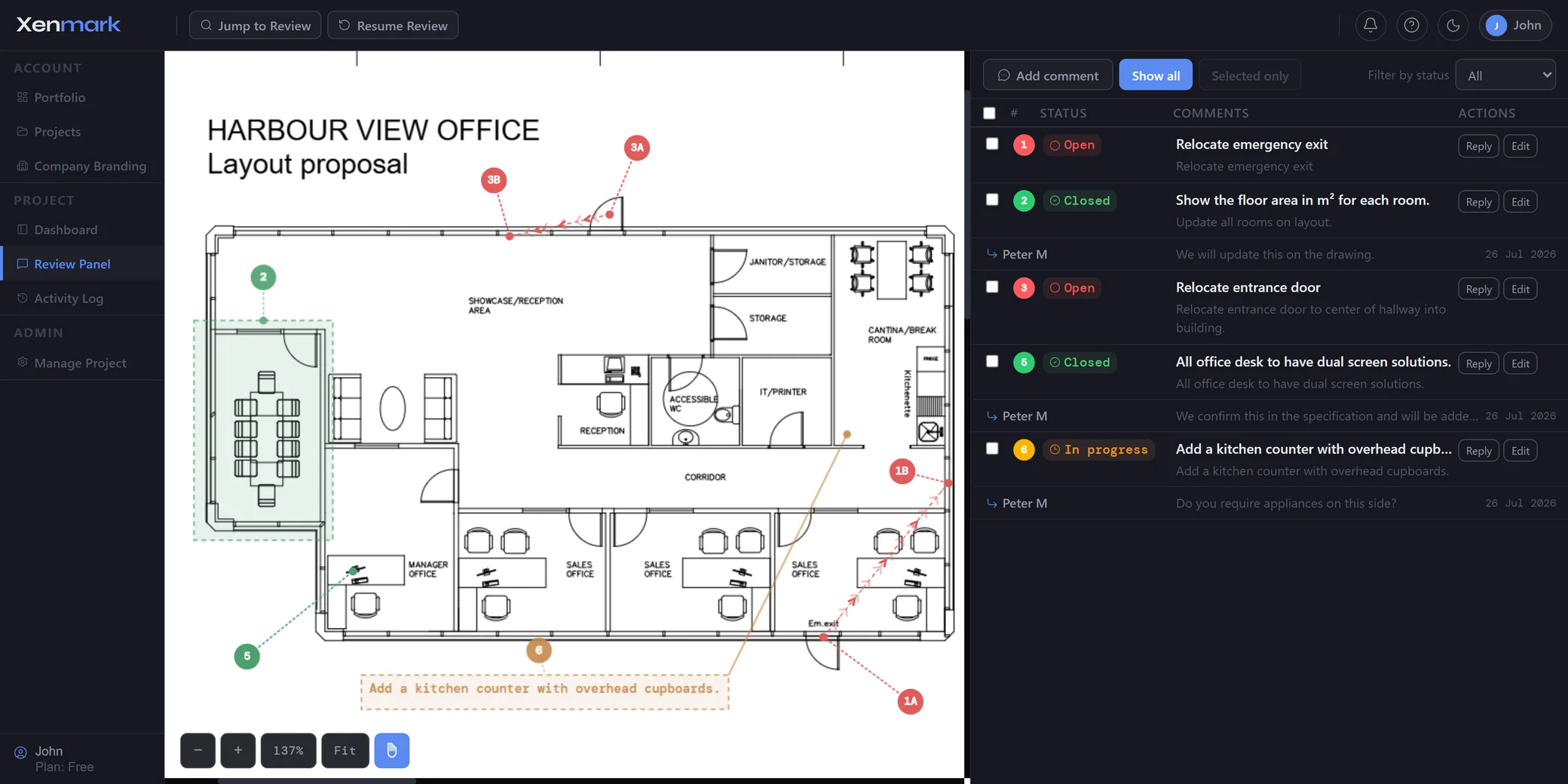
A numbered pin, rectangle or callout identifies the drawing location. The written comment explains the issue. Replies and status show how the team worked through it.
The designer then makes the technical change in the normal controlled authoring environment.
This separation is useful because a reviewer does not need edit access to the model merely to identify a problem.
How should Project Manager, Editor and Participant roles be used internally?
The Project Manager runs the project and access.
Use Editors for hands-on reviewers who need to upload drawings, add comments or annotations, reply and update statuses.
Use Participants for people who mainly need to view the review, answer existing comments and export.
The exact role assignment depends on the team, but the principle is simple: give people the level of review access they need without giving everyone project-management control.
How can an internal team track whether its own comments were addressed?
Use the comment status during the review, then check the next issued PDF against the earlier review history.
The status shows where the internal review item sits. The revision history preserves the context in which it was raised.
Xenmark does not automatically confirm that the design change is correct. The internal reviewer still checks the next revision.
See Comment Tracking and Revision Review.
Can an internal review use measurements, symbols and image attachments?
Yes. Those tools can add useful review context.
A reviewer can measure a clearance shown on the drawing, use a quick symbol to identify a checked area, attach an image in a reply or @mention the person who needs to answer the point.
They remain review aids rather than formal design verification.
How does internal review differ from External Drawing Review?
Internal Drawing Review is about getting the team’s own feedback organised before the drawing moves outside the organisation or core project group.
External Drawing Review is about coordinating people from different organisations in the same review.
Many projects use both: an internal round first, then an external round with the client, owner, contractor or supplier.
Can internal review be used before formal approval?
Yes. The team can work through its own comments before a drawing is submitted to a customer, document-control process, authority or other formal acceptance step.
The internal review can reduce avoidable unanswered points reaching the next stage, but it should not be described as guaranteeing approval or compliance.
See Drawing Approval.
What should the team keep after the internal review?
Export the Comment Plan PDF and Excel register if the review needs a portable record. When the project or review is closed, download the archive bundle if the organisation needs the broader history.
The controlled issued drawing and permanent records should still be stored in the organisation’s normal document system.
Which internal reviews are a good fit?
Good examples include pre-issue design checks, discipline reviews, coordination checks, internal quality comments and project-team review rounds where the immediate job is to identify drawing issues and work through them before a wider release.
Xenmark can structure the comments, but it does not replace an organisation’s engineering check procedure, professional sign-off or quality-management system.
Collaborative internal review is not formal verification.
Why use a shared review instead of emailing the PDF around the office?
Internal teams can fragment a review just as easily as external ones. One reviewer may annotate the PDF, another may send a Teams message, and a third may edit a spreadsheet somebody else already changed.
Using one shared review means the team can see the same comment location, thread and status without first reconciling everybody’s personal copy.