A drawing comment register is useful because it turns review feedback into a structured list. The problem begins when the spreadsheet and marked-up PDF are maintained separately.
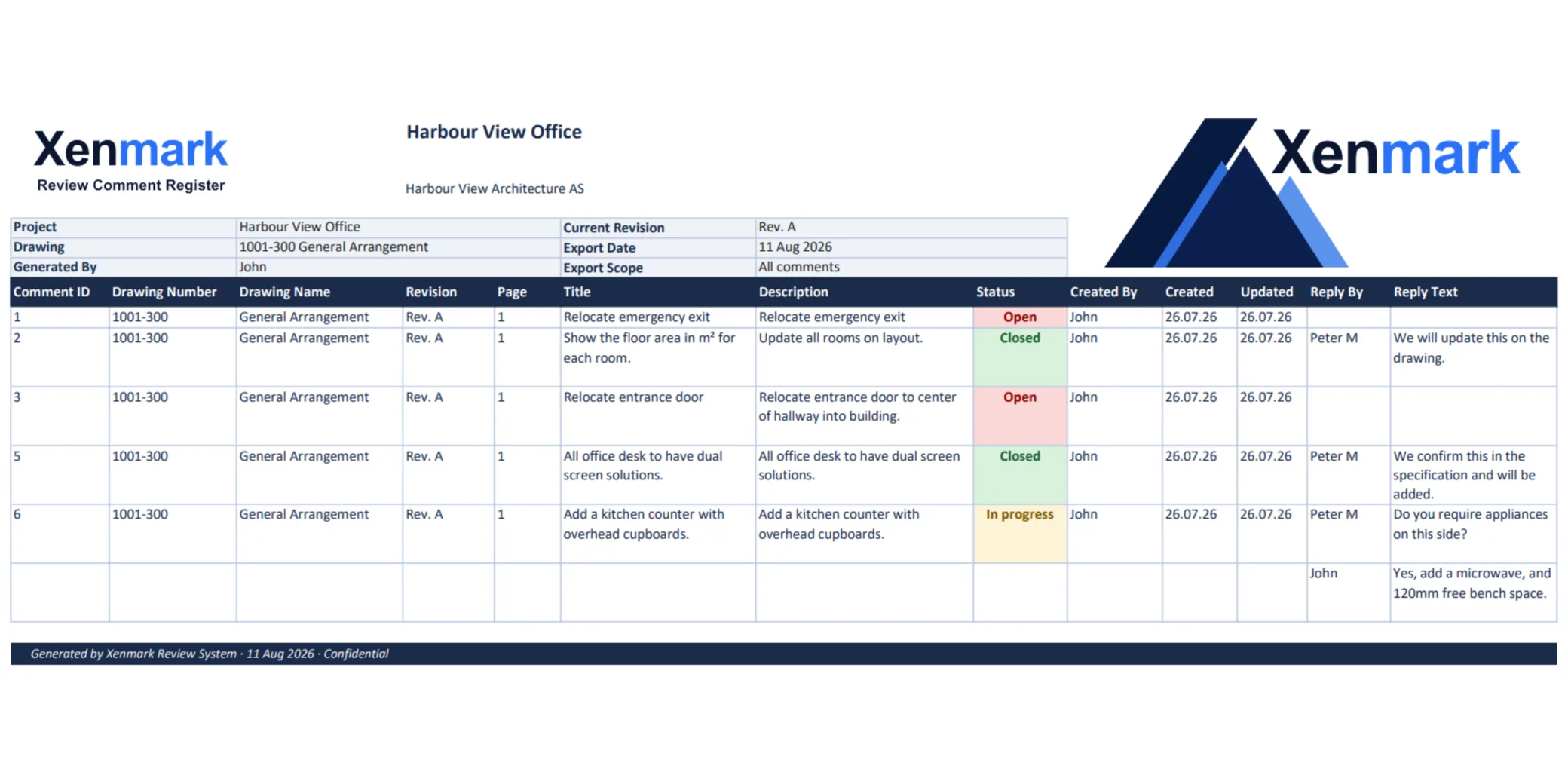
Xenmark generates the Excel comment register and Comment Plan PDF from the same review so the numbers on the list match the locations on the drawing.
What is a drawing comment register?
A drawing comment register is a structured list of review points associated with a technical drawing. It normally helps a team identify the comment number, what the reviewer said, who raised it, how the item was answered and its current review status.
The register is useful for filtering, reporting, project meetings and handover.
Its weakness is spatial context. A spreadsheet row can explain the issue, but somebody still needs to find the exact location on the drawing.
Xenmark keeps the visual and tabular sides connected.
How does Xenmark create the register?
The register is generated from the comments created during the review.
Because the comment exists first as a numbered review item on the drawing, the exported Excel row and the marked location share the same numbering.
That avoids a separate manual process where somebody has to type comment numbers into a spreadsheet and then maintain matching numbers on a PDF.
The spreadsheet becomes an output from the review rather than the place where the entire review must happen.
What is the Comment Plan PDF?
The Comment Plan PDF is the drawing export that shows the numbered review information in its spatial context.
Someone reading the Excel register can locate comment 17 on the PDF. Someone looking at comment 17 on the PDF can find the corresponding entry in the spreadsheet.
That two-way relationship is the core value of this Use Case.
What happens to measurements and symbols in the exports?
Measurement and symbol information is also carried through the export workflow. The Excel workbook includes a separate measurement and symbol register so dimensional markup does not have to be mixed into the comment list.
This is especially useful for reviews that use both discussion comments and visual measurement/check markups.
See Drawing Measurement and PDF Markup.
How is this different from Drawing Comment Tracking?
Drawing Comment Tracking is the live collaborative process. The team raises issues, replies, changes status and follows the review.
Drawing Comment Register is the structured file output for people who need the review in a portable spreadsheet and marked-up PDF.
The same project can use both.
Can the register be used outside Xenmark?
Yes. The point of the export is portability.
The Excel file can be used for reporting, filtering, project records or exchange with organisations that still work from conventional comment sheets. The Comment Plan PDF provides the corresponding drawing context.
The exported files should be stored wherever the user’s normal document process requires them.
Can exports use the organisation’s own branding?
Paid Xenmark plans support custom-branded PDF and Excel exports. Plans and limits lists what each plan includes.
Either way, one review creates the two matching deliverables.
Is the comment register an approval record?
It is a review record. It should not be described as a formal approval certificate, regulated archive or technical verification merely because it records comments and statuses.
If the project requires a controlled approval record, signed document or statutory submission, continue through the required process.
What should happen when the project is completely finished?
Use the Comment Plan PDF and Excel register as the principal review deliverables, then download the full project archive when the review is closed if you need the broader package containing attachments and activity history.
See Drawing Review Handover & Project Archive.
What should a useful drawing comment register make easy?
A reader should be able to identify the comment, understand the written issue, see its review context and find the corresponding location on the drawing without guessing.
The strongest register workflow therefore has two complementary views:
- the spreadsheet for sorting and reading the list;
- the marked-up PDF for spatial context.
Xenmark’s matching numbering connects those two views.
That does not make Excel obsolete. Many technical projects will continue to require spreadsheets precisely because they are portable and easy to hand over.
Why generate the register instead of typing it separately?
Manual registers create another synchronization job. Somebody must ensure the comment number, text, status and response in the spreadsheet still match the markups on the latest PDF.
When both outputs come from the same structured review, the team reduces the amount of information it has to duplicate by hand.
That does not mean the export will replace every customer-specific register template. Some projects may still transfer or reformat information for their required process. Xenmark’s value is providing a clean source review and matching standard outputs.