Dense piping and machinery drawings can contain repeated symbols, small tags, several sheets and connections that lead to another document. “Move this valve” may sound clear to the person looking at the screen, but it may be ambiguous to the engineer who receives the comment later.
The goal is to make a review point locatable and answerable. Use the issued drawing identity, place the comment at the relevant feature, and repeat the available tag, line or space reference in the text. When a new revision arrives, check the issue manually rather than assuming the earlier comment has moved to the correct new location.
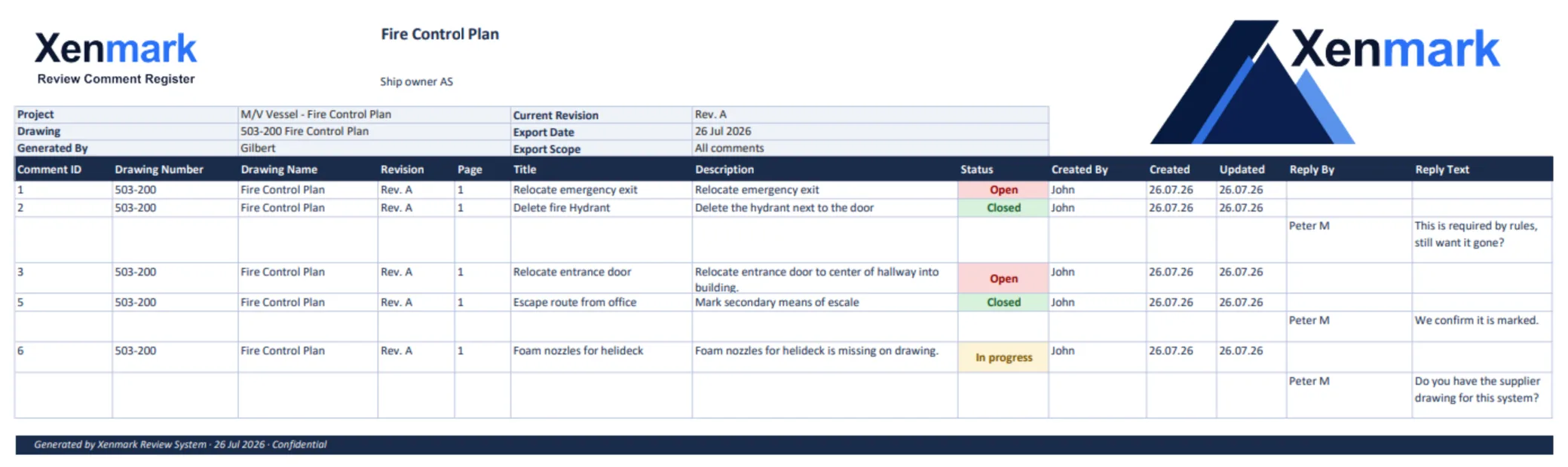
Identify the exact item
Start with drawing number, title, revision, sheet and area. On a piping diagram, a line number, valve tag or equipment tag may help. On a machinery arrangement, compartment, deck, frame or adjacent equipment can narrow the location. If the drawing lacks a unique label, describe nearby features and state the uncertainty.
Weak: “This connection is wrong.” Stronger: “On P-302 Rev A, sheet 2, the connection shown beside valve V-17 appears different from the installed arrangement in the attached photograph. Please verify the valve and line identification before revising the drawing.” The stronger point does not pretend the observer already knows the technical solution.
Separate observation, question and proposed change
An onboard photograph may show a different route from the drawing. A supplier note may propose a new connection. An engineer may have a design reason for neither. Record which of those statements is an observation, which is a question and which is a proposal. This helps keep technical responsibility with the appointed party.
Illustrative example: A superintendent points to a pump connection on machinery arrangement M-104 Rev A and adds a photograph. The engineer asks for the associated piping drawing and equipment tag. A supplier clarifies its connection location. The engineer assesses the interface and issues revised PDFs as needed. No one treats the original PDF annotation as an approved piping design.
Use measurements carefully
A calibrated PDF measurement can help frame a discussion about apparent clearance, access or routing. It should say which drawing scale and reference were used. A screen measurement is not a replacement for controlled dimensions, a site survey, equipment data or engineering calculations. If an answer depends on a few millimeters, send the question to the responsible technical party for verification.
Manage multi-sheet and cross-drawing packages
Keep a small index of which drawing and sheet contains each point. If a comment on a machinery arrangement depends on a line shown in a piping drawing, record both references. Avoid duplicating the same unresolved technical question as three separate “masters”; cross-reference related points and identify who owns the response.
When the next revision arrives, confirm whether the changed file is the machinery drawing, the piping drawing, a supplier document or several of them. Check each affected issued PDF, not just the one that first carried the comment.
Check old points and new changes
Earlier review history remains on its original revision. Read the old question and reply, inspect the new drawing, record the human conclusion, and then scan the revised area for new issues. Do not mark a point Closed merely because a revision number increased. Retain the review record with its drawing context.
Xenmark can support location-specific PDF comments, replies and later-revision review. The responsible engineer remains in charge of technical interpretation and authored revisions. For the full second-round method, see How to Review Revised Ship Drawing PDFs; for vessel-side changes, see Vessel Drawing Updates.
A repeatable review pass for a dense drawing
Begin by scanning the title block, legend and sheet references. Then review the drawing by area or system rather than jumping between unrelated comments. For each concern, capture the local identifier and the nearest cross-reference. If the same equipment appears on another sheet, check whether the labels agree before assuming the drawings conflict. Mark a possible inconsistency as a question, with the two exact drawing issues cited.
After the first pass, review responses in the order that technical dependencies require. A pump-position answer may affect a line-route question; a changed valve tag may affect a schedule. Link related points without merging them into one unanswerable comment. At the end, scan the drawing again for unmarked interfaces that the discussion may have exposed.
What if a PDF is too dense to mark unambiguously?
Pin the approximate area and repeat the precise tag or line reference in the text. Add a cropped image or detail reference only when the project permits it and the crop retains enough context to identify the source drawing and revision. Do not create a separate image that becomes detached from its controlled PDF. If the item itself has no stable label, the comment should say which two or three nearby features bound the area.
For example, “between pump P-2 discharge and valve V-17 on sheet 2” is more actionable than “upper left line.” Even that example requires technical verification before being used with a real drawing; the point is to make the reference intelligible to the next reviewer.
How should the team respond when a revision changes several sheets?
First list the changed drawing numbers and issues. Check each previous point against the corresponding new sheet, then inspect cross-sheet connections. A line may retain its route on one sheet but show a different termination on another. Do not assume a single “Rev B checked” note covers every affected document. Record who reviewed which sheet or discipline, and keep any unresolved interface assigned.
If an issued revision moves a symbol, do not copy the old comment pin to the nearest new symbol automatically. Read the old question, inspect the new design context and decide whether the concern is addressed. That human disposition is the bridge between revisions.
A short handover record for the next reviewer
At the end of the round, state the drawing numbers and revisions examined, the systems or sheets covered, the identifiers of unresolved points, and the evidence still needed. If one discipline could not review its sheet, say so. A broad statement such as “piping checked” is less useful than “P-302 Rev B sheets 1–2 reviewed for points C-01 through C-07; connection at V-17 pending supplier confirmation.”
This record helps the next reviewer understand the scope without implying that the PDF review replaced engineering calculations, site verification or formal approval. It also shows where a question moved across documents: the original item may begin on a machinery arrangement and require a response on a piping diagram.
Keep technical labels consistent across the actual drawing set. If P-2 is the pump on an arrangement, confirm that a piping-sheet reference identifies the same equipment before linking the two comments. Check the legend, cross-reference and any measurement callout with the relevant specialist. A confident-looking but mismatched tag can send the review to the wrong item.
Related pages
Return to Maritime & Shipbuilding for the Industry hub. Ship Drawing Review & Markup explains shared issued-PDF comments; Vessel Drawing Updates explains onboard differences; the global Revision Review Use Case covers the second-round method. Shipyards, Marine Engineering Companies and Equipment Suppliers / Marine Vendors describe common participants.