A useful drawing comment register should answer four questions quickly: which issued drawing was reviewed, where is the issue, who needs to respond, and what happened next? It becomes difficult to use when the number on a PDF does not match the number in a spreadsheet, when one organization keeps a different master list, or when a new drawing revision erases the context of the earlier question.
There is no single column layout that every maritime project must use. The fields below are a practical example for owner–yard–engineering drawing review, not a universal standard or a formal approval document.
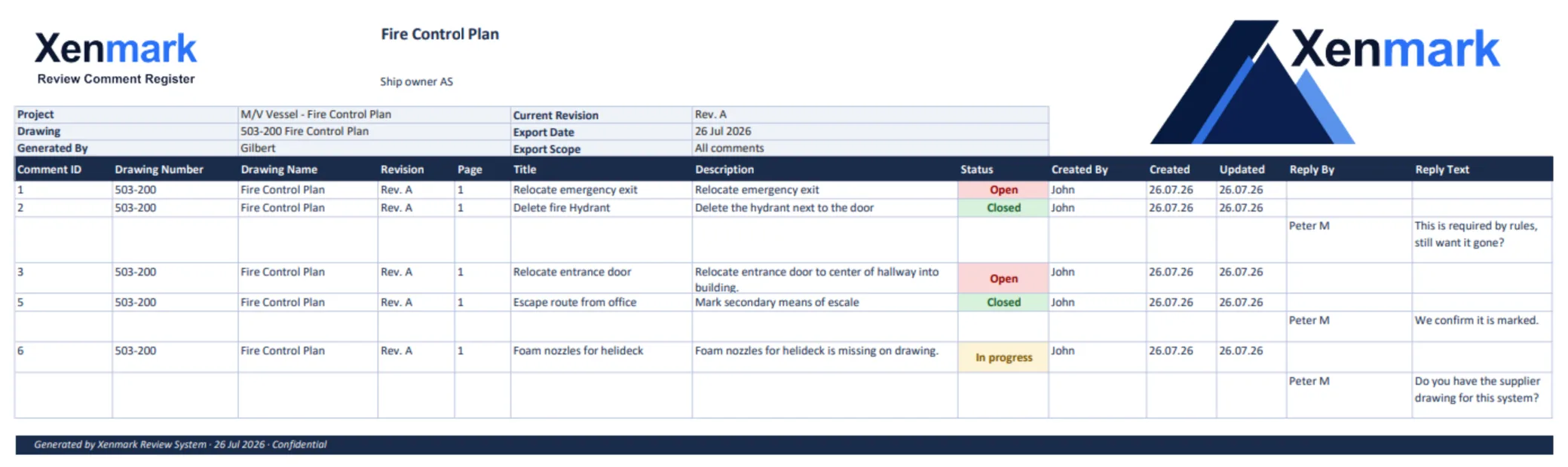
Start with a stable item identifier
Assign one ID to each review point and display that ID at the corresponding drawing location. If the PDF shows “C-12”, the register row should show “C-12”. This lets the respondent find the issue without searching a paragraph of email. Do not reuse C-12 for a different question simply because the original was closed.
For each item, identify the project or vessel, drawing number and title, drawing revision, page or sheet, precise location or equipment tag, comment text, who raised it and when, responsible responder, reply, review status and outcome note. When a source is a field observation, note the photograph or reference behind it.
Keep one known master, even if you export copies
PDF exports and spreadsheet copies can be helpful handover formats. Trouble begins when a yard edits one copy, an owner edits another, and no one can tell which responses were agreed. Decide at the project level where the live review record resides and how external parties send corrections. If a spreadsheet is the master, protect stable IDs and revision references. If a shared review tool is the master, treat exports as snapshots with a date and issue reference.
Preserve revision context
A comment on drawing Rev A should continue to say Rev A after Rev B is issued. The reviewer checks Rev B and records whether the earlier concern appears addressed, remains open, needs clarification or is no longer relevant. That conclusion can be captured in a review worksheet or later-round note. It should not be achieved by silently moving the old comment to a new drawing location.
Illustrative sample rows:
| ID | Drawing / issue | Location | Comment | Reply / outcome |
|---|---|---|---|---|
| C-01 | M-104 Rev A | Pump P-2 | Installed position appears different; please verify | Engineer requests dated photo; Rev B to be checked |
| C-02 | M-104 Rev A | Valve V-7 | Tag in field photograph differs from drawing | Tag identification still under review |
| C-03 | M-104 Rev B | P-2 connection | New question on revised interface | Assigned to engineer |
These IDs and drawing names are teaching examples. They are not a customer register, and the example outcomes are not Xenmark status values. Xenmark’s review statuses are Open, In progress and Closed.
Keep replies and decisions with the point
An answer such as “updated” is often not enough. A useful reply names the drawing revision or other evidence that addresses the question. If the owner, yard and engineer disagree, keep the discussion visible until the responsible decision maker under the project process resolves it. Closing a review point records that team’s decision; it does not certify technical compliance.
Know when a spreadsheet is sufficient
For a few points and one reviewer, a carefully managed spreadsheet with a marked PDF may be entirely adequate. As reviewers and revisions multiply, matching copied lists to drawing locations and replies becomes harder. A shared PDF-review layer can keep the numbered location and discussion together, with a portable register export.
For the commercial workflow, see Maritime Drawing Comment Register; for ship-wide updates, see Vessel Drawing Updates. The global Drawing Comment Register Use Case covers the generic deliverable.
How should a row change when the next drawing issue arrives?
Keep the old row’s drawing identity intact. Add the new issue and the reviewer outcome as a later-round field or linked review item. If the response was “will revise,” that is a promise about future work, not evidence that a particular issued revision fixed the point. Only after a reviewer inspects the returned drawing should the outcome say what was seen.
The register should also distinguish a duplicate from a related but new issue. If two reviewers raise the same valve-tag question on the same revision, reference one stable item and retain both contributions. If the new revision moves the valve but creates an access concern, give the access question a new item and cross-reference the original. This keeps counts meaningful without losing the technical story.
Who may edit or close a point?
That is a project governance choice. A practical rule may allow any invited reviewer to raise a question, the appointed technical party to answer it, and an owner or discipline reviewer to confirm whether the answer resolves the concern. Another contract may allocate those steps differently. State the rule at the start of the review and preserve a history of changes. A status without a responsible person or reason is less useful than a plain sentence saying what was decided.
How can a recipient check the quality of an exported register?
Sample a few rows against the PDF: does the point number appear at the stated location, is the drawing revision clear, and can the reader find the reply? Look for blank owners, generic answers such as “noted,” and issues marked Closed without a disposition. Check that the export date and review round are visible so a later reader does not mistake a snapshot for the current master.
The best template is the one the project can maintain reliably. A large list of columns does not create traceability if people skip the fields that explain location, response and revision. Start with the minimum information that lets another reviewer find and understand the issue, then add fields required by the project’s own process.
For repeated work on the same vessel, a project can keep a short register guide next to the template: how point IDs are assigned, how a drawing issue is named, who may answer and close items, and where exported snapshots are stored. That small amount of governance is more useful than adding columns no one understands.
Related pages
Return to Maritime & Shipbuilding for the Industry hub. Maritime Drawing Comment Register shows the ship-specific product workflow; Ship Drawing Review & Markup shows how points begin on an issued PDF. The global Drawing Comment Register & Review Deliverables Use Case covers the generic export. The Ship Owners, Shipyards and Marine Engineering Companies Team pages cover the participating roles.